Getting Started
Initial Setup
Step 1: Access Blockpeer eTrade
- Log in to your BlockPeer account
- From the module selection screen, click on eTrade
- You'll be taken to the eTrade dashboard
Step 2: Understanding the Dashboard
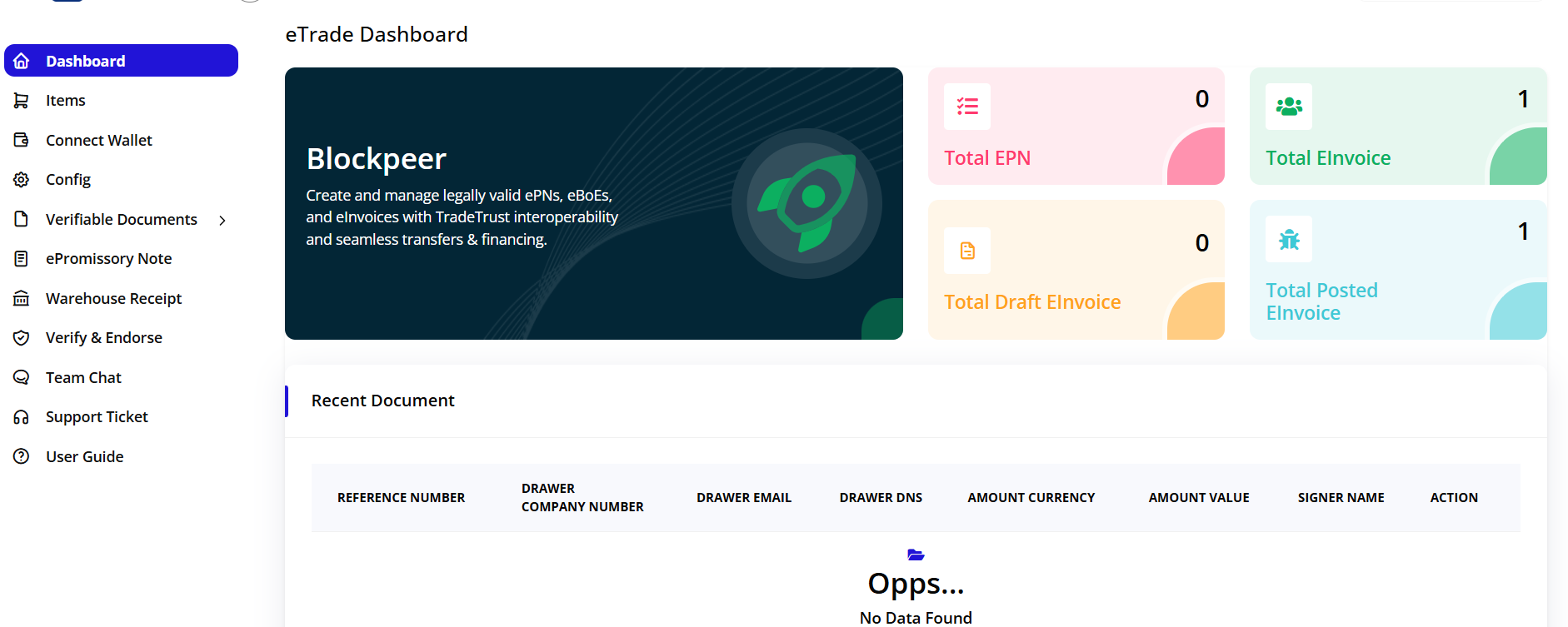
The eTrade dashboard provides a comprehensive overview of your trade document activities:
Key Metrics:
- Total EPN: Electronic Promissory Notes created (0)
- Total EInvoice: Electronic Invoices issued (1)
- Total Draft EInvoice: Invoices being prepared (0)
- Total Posted EInvoice: Published invoices (1)
Dashboard Features:
- Create and manage legally valid ePNs, eBoEs, and eInvoices
- TradeTrust interoperability for global acceptance
- Seamless transfers and financing capabilities
- Blockchain-based document verification
- Recent documents overview
Step 3: What is eTrade?
eTrade is Blockpeer's electronic trade document management system that enables:
Digital Trade Documents:
- Electronic Invoices (eInvoices)
- Electronic Promissory Notes (ePNs/eBoEs)
- Electronic Warehouse Receipts
- Verifiable trade documents
Key Benefits:
- Legal Validity: Documents are legally recognized
- TradeTrust Compatible: Interoperable with global trade networks
- Blockchain Verified: Tamper-proof and verifiable
- Instant Transfer: Transfer ownership digitally
- Financing Ready: Use documents for trade financing
- Reduced Costs: Eliminate paper-based processes
Step 4: Understanding TradeTrust
What is TradeTrust?
TradeTrust is a digital utility that comprises a set of globally-accepted standards and frameworks that connects governments and businesses to a public blockchain to enable trusted interoperability and exchanges of electronic trade documents across digital platforms.
Benefits of TradeTrust:
- International recognition and acceptance
- Legally equivalent to paper documents
- Verifiable authenticity
- Secure document transfers
- Integration with trade finance systems
TradeTrust Website: Visit tradetrust.io to:
- Verify Blockpeer documents
- Learn about TradeTrust standards
- Check document authenticity
- Access verification tools
Initial Configuration Required
Before creating trade documents, you must complete the configuration:
Configuration Steps Overview
- Connect Wallet (Required First)
- Create Token Registry (Required Second)
- Add DNS Record (Required Third)
- Verify DNS Configuration (Required Fourth)
Only after completing these steps can you create trade documents.
Quick Start Guide
For First-Time Users
Step 1: Navigate to Config
- Click Config in the sidebar
- You'll see the configuration page
Step 2: Connect Wallet
- Click Connect Wallet button
- Select your blockchain network (Sepolia, XDC, etc.)
- Connect your crypto wallet (MetaMask, WalletConnect, etc.)
- Approve the connection
Step 3: Create Token Registry
- After wallet connection, click Create Token Registry
- Transaction will be submitted to blockchain
- Wait for confirmation (30-60 seconds)
- Token registry address will be generated
Step 4: Configure DNS
- Copy the provided DNS TXT record
- Add it to your domain's DNS settings
- Wait for DNS propagation (5-30 minutes)
- Return and verify DNS configuration
Step 5: Create Your First Document
- Go to E-Invoice or ePromissory Note
- Click Create New
- Fill in document details
- Generate and issue document
For Creating Documents
Once configured, creating documents is simple:
E-Invoice:
- Select customer
- Add line items
- Choose payment method (Crypto)
- Select token and DNS
- Generate invoice
ePromissory Note:
- Enter party details (Drawer)
- Specify amount and dates
- Add beneficiary information
- Select DNS
- Create note
Warehouse Receipt:
- Enter warehouse information
- Specify grain/commodity details
- Add depositor information
- Include quantity and charges
- Generate receipt
Navigation Overview
Main Menu Structure
Dashboard
- View trade document statistics
- Access recent documents
- Monitor document activity
Items
- Manage products/services
- Set up item catalog
- Define pricing
Connect Wallet
- Connect blockchain wallet
- Switch networks
- View wallet status
Config
- Token registry setup
- DNS configuration
- Blockchain settings
Verifiable Documents
- Configuration settings
- E-Invoice management
- All trade documents
ePromissory Note
- Create electronic promissory notes
- Manage ePNs
- Transfer and endorse
Warehouse Receipt
- Create warehouse receipts
- Track stored commodities
- Manage warehouse documents
Verify & Endorse
- Verify document authenticity
- Endorse documents
- Transfer ownership
- Check TradeTrust verification
Team Chat
- Internal communication
- Discuss documents
- Collaborate with team
Support Ticket
- Get technical help
- Report issues
- Track support requests
User Guide
- Access documentation
- Tutorial videos
- Best practices
Understanding Document Types
Electronic Invoice (eInvoice)
What is an eInvoice?
- Digital invoice on blockchain
- Verifiable and transferable
- Can be used for financing
- Legally recognized
Use Cases:
- B2B invoicing
- International trade
- Trade finance
- Supply chain payments
Electronic Promissory Note (ePN/eBoE)
What is an ePN?
- Digital bill of exchange
- Electronic promissory note
- Negotiable instrument
- Blockchain-secured
Use Cases:
- Trade credit
- Payment guarantees
- Invoice discounting
- Trade financing
Warehouse Receipt
What is a Warehouse Receipt?
- Digital proof of commodity storage
- Transferable ownership document
- Used for collateral
- Grain elevator receipts
Use Cases:
- Agricultural commodities
- Warehouse financing
- Inventory management
- Collateralized lending
Blockchain and Crypto Integration
Wallet Connection
Supported Wallets:
- MetaMask
- WalletConnect
- Coinbase Wallet
- Other Web3 wallets
Supported Networks:
- Sepolia (Ethereum Testnet)
- XDC Network
- Polygon
- Other EVM-compatible chains
Why Blockchain?
Benefits:
- Immutable Records: Documents cannot be altered
- Global Verification: Anyone can verify authenticity
- Instant Transfer: Transfer ownership in seconds
- Cost Efficient: Lower transaction costs
- Transparency: Complete audit trail
- Decentralized: No single point of failure
Token Registry
What is Token Registry? A smart contract on blockchain that:
- Issues document tokens
- Tracks document ownership
- Manages transfers and endorsements
- Provides verification proof
Your Token Registry:
- Unique blockchain address
- Linked to your DNS domain
- Controls all your documents
- Enables TradeTrust verification
DNS Integration
Why DNS is Required
DNS (Domain Name System) integration provides:
- Proof of document issuer identity
- Links blockchain address to your domain
- Enables TradeTrust verification
- Establishes trust and authenticity
DNS Record Format
The DNS TXT record looks like:
"\"openatts net=ethereum netId= 50 addr=0x0b35CDDF1DfDF6e830eE79bF8ba18AEf88183d29\""
This record:
- Links your domain to token registry
- Specifies blockchain network
- Provides contract address
- Enables verification
Domain Records Added
After DNS configuration, you'll see:
- Your domain name
- Associated token registry address
- Network information
- Verification status
Security and Compliance
Document Security
Blockchain Protection:
- Cryptographic signatures
- Immutable storage
- Tamper-evident technology
- Public verification
Access Control:
- Wallet-based authentication
- Owner-only modifications
- Controlled transfers
- Audit trails
Legal Validity
Electronic Documents:
- Legally equivalent to paper
- Compliant with electronic transaction laws
- Accepted by financial institutions
- Court-admissible evidence
Standards Compliance:
- TradeTrust framework
- MLETR (Model Law on Electronic Transferable Records)
- National electronic transaction laws
- International trade standards
Best Practices
Setup Phase
- Choose Network Carefully: Use mainnet for production, testnet for testing
- Secure Your Wallet: Use hardware wallet for high-value documents
- Verify DNS Propagation: Wait for full DNS propagation before creating documents
- Test First: Create test documents before production use
- Backup Private Keys: Never lose access to your wallet
Document Creation
- Complete Information: Fill all required fields accurately
- Verify Details: Double-check amounts, dates, and party information
- Use Correct Network: Ensure documents on intended blockchain
- Save Confirmation: Keep transaction hashes and document IDs
- Regular Backups: Download and store document copies
Document Management
- Track Ownership: Monitor document ownership changes
- Verify Before Accept: Always verify documents before accepting transfers
- Timely Endorsements: Process endorsements promptly
- Maintain Records: Keep complete transaction history
- Regular Reconciliation: Match blockchain records with internal systems
Common Use Cases
International Trade
Scenario: Export Invoice
- Seller creates eInvoice for buyer
- Buyer receives and verifies document
- Document used as proof for customs
- Payment processed against invoice
- Invoice can be financed by bank
Trade Financing
Scenario: Invoice Discounting
- Supplier issues eInvoice to buyer
- Supplier transfers invoice to financier
- Financier advances payment (minus discount)
- Buyer pays financier at maturity
- All transfers tracked on blockchain
Agricultural Commodities
Scenario: Grain Storage
- Farmer deposits grain at warehouse
- Warehouse issues digital receipt
- Receipt used as loan collateral
- Bank finances against receipt
- Receipt transferred when grain sold
Letter of Credit
Scenario: LC Transaction
- Buyer's bank issues LC
- Seller creates conforming eInvoice
- Documents submitted electronically
- Bank verifies via blockchain
- Payment released automatically
Troubleshooting
Q: Wallet won't connect A: Ensure wallet extension is installed and unlocked. Try refreshing page. Check that you're on supported network.
Q: Token registry creation failed A: Check wallet has sufficient funds for gas fees. Verify network connectivity. Try again after a few minutes.
Q: DNS verification failing A: DNS changes take 5-30 minutes to propagate. Wait and try again. Verify TXT record is added correctly to your domain.
Q: Can't create documents A: Ensure you've completed all configuration steps: wallet connected, token registry created, DNS verified.
Q: Document not showing on TradeTrust A: Check DNS is properly configured. Verify document was created with correct token registry. Allow time for blockchain confirmation.
Q: Transaction pending too long A: Check blockchain explorer for transaction status. If stuck, may need to speed up with higher gas fee or wait for network congestion to clear.
Q: How do I verify a document from another party? A: Go to Verify & Endorse section, drag and drop the document file, or verify directly on tradetrust.io.
Getting Help
Support Resources
In-App Support:
- Click Support Ticket from menu
- Describe your issue in detail
- Attach screenshots if helpful
- Include wallet address and transaction hash
Documentation:
- User Guide: Comprehensive documentation
- Config Guide: Setup instructions
- E-Invoice Guide: Invoice creation help
- Verify & Endorse Guide: Verification instructions
External Resources:
- TradeTrust Documentation: tradetrust.io/docs
- Blockchain Explorer: View transactions
- Community Forum: Ask questions
- Video Tutorials: Step-by-step guides
Email Support:
- support@blockpeer.com
- Include detailed description
- Provide transaction hashes
- Attach relevant documents
Next Steps
Now that you understand the basics:
- Complete Configuration following the Config guide
- Create Your First eInvoice using the E-Invoice guide
- Explore ePromissory Notes for trade credit
- Try Warehouse Receipts if handling commodities
- Learn Verification using Verify & Endorse
- Visit TradeTrust.io to see external verification
Quick Reference
Configuration Checklist
- ☐ Wallet connected
- ☐ Correct network selected
- ☐ Token registry created
- ☐ DNS TXT record added to domain
- ☐ DNS verification successful
- ☐ Domain records showing correctly
- ☐ Test document created
- ☐ Document verified on TradeTrust
Document Status Guide
| Status | Meaning | Actions Available |
|---|---|---|
| Draft | Being prepared | Edit, Delete, Issue |
| Issued | Published on blockchain | View, Transfer, Verify |
| Transferred | Ownership changed | View, Accept, Endorse |
| Surrendered | Document voided | View only |
| Accepted | Received and acknowledged | View, Further transfer |
Network Information
| Network | Purpose | Gas Token | Use For |
|---|---|---|---|
| Sepolia | Testing | SepoliaETH | Development and testing |
| XDC | Production | XDC | Real trade documents |
| Polygon | Production | MATIC | Lower cost transactions |
| Ethereum | Production | ETH | High-value documents |
Important Links
| Resource | URL | Purpose |
|---|---|---|
| TradeTrust | tradetrust.io | Verify documents |
| TradeTrust Docs | docs.tradetrust.io | Learn standards |
| Sepolia Explorer | sepolia.etherscan.io | Track Sepolia transactions |
| XDC Explorer | xdc.network | Track XDC transactions |
| Support | support@blockpeer.com | Get help |