Warehouse Receipt
Overview
Warehouse Receipt is an electronic document that represents proof of commodity storage in a warehouse or grain elevator. It's a legally binding digital document that proves ownership of stored goods, secured on blockchain and verifiable via TradeTrust. Warehouse receipts are crucial for agricultural financing, commodity trading, and supply chain management.
What is Warehouse Receipt?
Traditional Warehouse Receipt
A warehouse receipt is:
- Proof of commodity storage
- Document of title (ownership proof)
- Issued by warehouse operator
- Specifies quantity, grade, quality
- Negotiable instrument (can be transferred)
- Used as collateral for loans
Electronic Warehouse Receipt
eWarehouse Receipt digitalizes this:
- Blockchain-Based: Immutable storage proof
- Legally Equivalent: Same status as paper receipts
- Transferable: Digital ownership transfer
- Verifiable: TradeTrust verification
- Financing Ready: Use as loan collateral
- Secure: Tamper-proof, traceable
Key Components
Essential Information:
Receipt Details:
- Receipt number
- Issue date
- Warehouse location
- Storage conditions
Commodity Information:
- Grain type (corn, wheat, soybeans, etc.)
- Quantity (bushels, tons, kg)
- Grade and quality
- Variety
- Moisture content
- Test weight
Parties:
- Warehouse/Elevator company
- Depositor (farmer, trader)
- Current owner (if transferred)
Charges:
- Storage fees
- Handling charges
- Insurance fees
- Other applicable charges
Use Cases
Agricultural Finance:
- Farmers use as loan collateral
- Banks lend against stored grain
- Commodity-backed financing
- Harvest financing
Commodity Trading:
- Transfer grain ownership digitally
- No physical movement needed
- Reduce trading costs
- Instant settlements
Supply Chain Management:
- Track commodity custody
- Verify storage conditions
- Quality assurance
- Audit trail
Inventory Management:
- Real-time stock tracking
- Multiple warehouse coordination
- Automated reconciliation
- Blockchain transparency
Prerequisites
Before creating Warehouse Receipts:
- ✅ Configuration completed
- ✅ Wallet connected
- ✅ Token registry created
- ✅ DNS verified and added
- ✅ Sufficient gas tokens
- ✅ Warehouse operator authorization
Accessing Warehouse Receipt
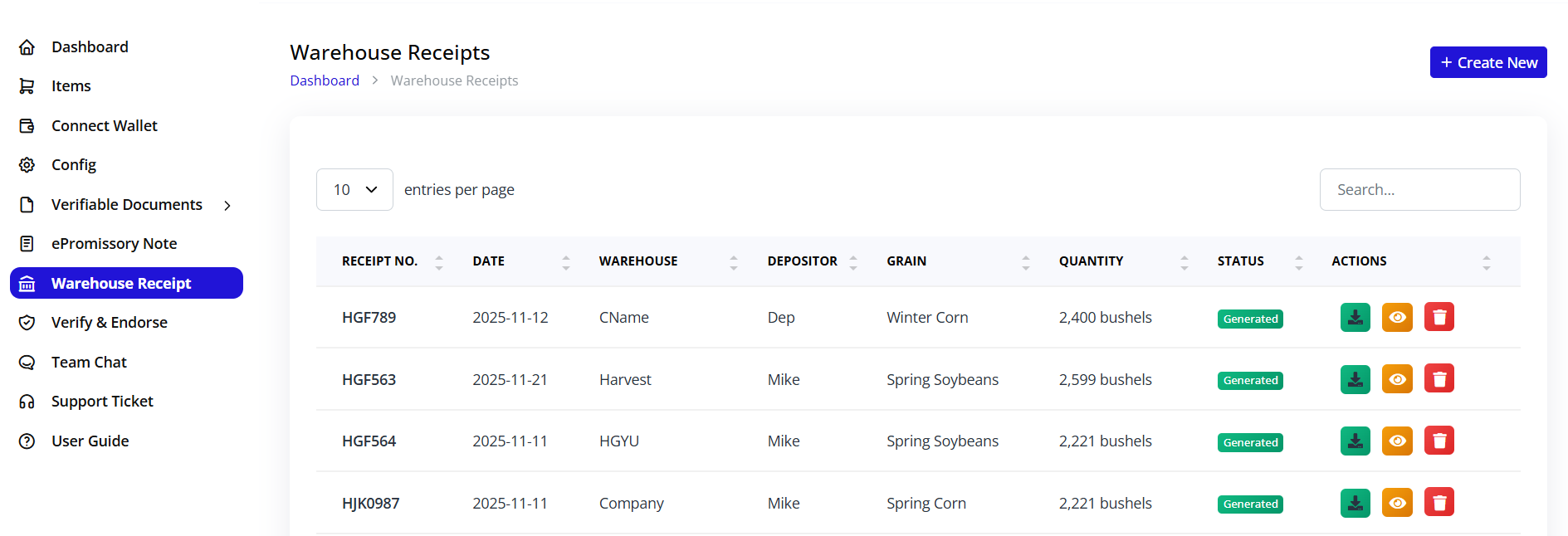
- Click Warehouse Receipt in sidebar
- Warehouse Receipt module opens
- List of existing receipts displayed
Dashboard Overview
Top Action Button:
- + Create New (blue button): Create new warehouse receipt
Table Columns:
RECEIPT NO.:
- Unique receipt identifier
- Format: HGF789, HGF563, etc.
- Clickable to view details
DATE:
- Issue date
- Format: YYYY-MM-DD
- When commodity was deposited
WAREHOUSE:
- Warehouse/elevator name
- Storage facility
- Location identifier
DEPOSITOR:
- Person/company who deposited
- Farmer, trader, or company name
- Owner of commodity
GRAIN:
- Type of commodity
- Winter Corn, Spring Soybeans, etc.
- Crop specification
QUANTITY:
- Amount stored
- In bushels (US) or tons/kg
- Example: 2,400 bushels
STATUS:
- Current state
- Badge showing: Generated, Active, Released, etc.
ACTIONS:
- 📥 Download: Download receipt
- 👁️ View: View details
- 🗑️ Delete: Remove receipt (drafts only)
List Example
HGF789 | 2025-11-12 | CName | Dep | Winter Corn | 2,400 bushels | Generated | [Actions]
HGF563 | 2025-11-21 | Harvest | Mike | Spring Soybeans | 2,599 bushels | Generated | [Actions]
HGF564 | 2025-11-11 | HGYU | Mike | Spring Soybeans | 2,221 bushels | Generated | [Actions]
Filter and Search
Pagination:
- "10 entries per page" dropdown
- Options: 10, 25, 50, 100
- Previous/Next navigation
Search:
- Search box (top-right)
- Search by receipt number
- Search by depositor name
- Search by grain type
Creating Warehouse Receipt
Step 1: Initiate Creation
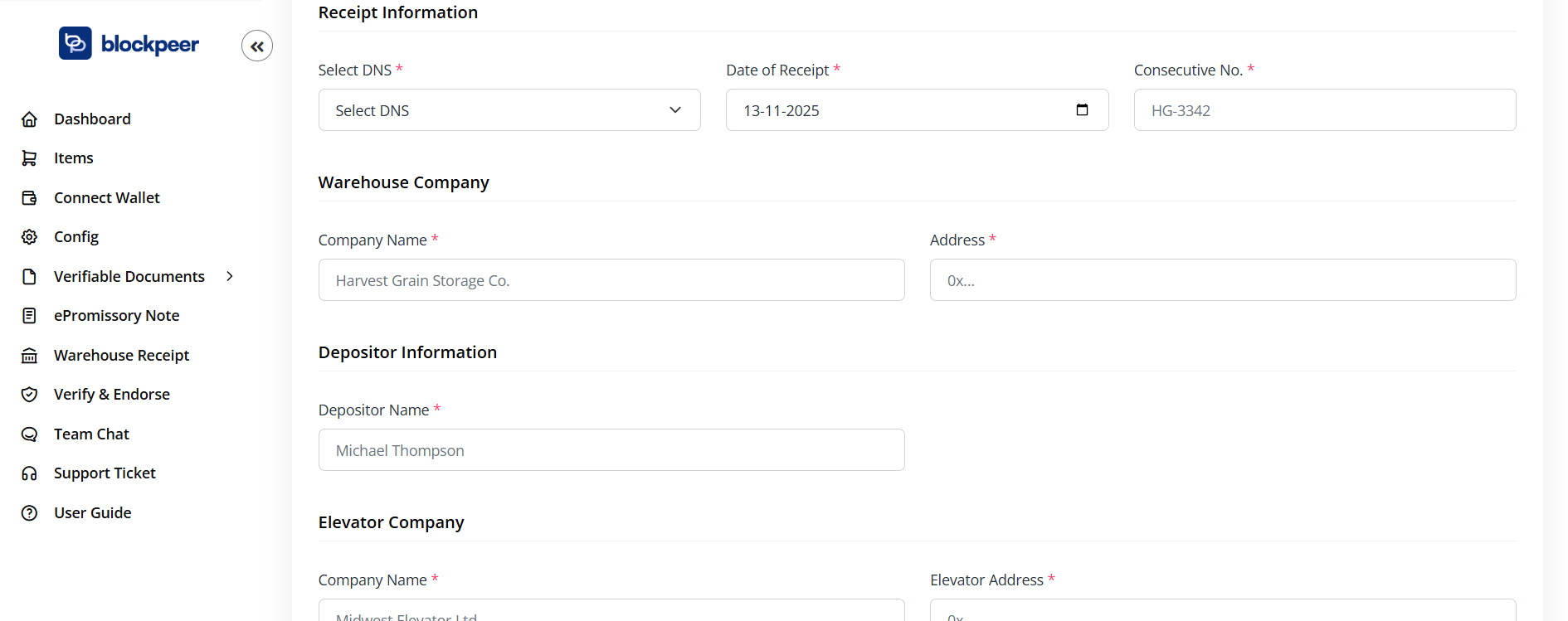
- Click + Create New button
- Create Warehouse Receipt form opens
- Breadcrumb: Dashboard > Create Warehouse Receipt
Step 2: Network and Wallet Connection
Top-Right Controls:
Select Network:
- Dropdown showing current network
- Example: "Select Netwo..."
- Choose blockchain network
- Must match token registry
Connect Wallet:
- Blue button
- Ensure wallet connected
- Required for blockchain transaction
- Shows wallet address when connected
Step 3: Receipt Information
Select DNS * (Required):
- Dropdown: "Select DNS"
- Choose your verified domain
- Links receipt to your identity
- Required for TradeTrust verification
- Must be configured domain
Date of Receipt * (Required):
- Date picker field
- Format: 13-11-2025 (DD-MM-YYYY)
- When commodity was received
- Usually today's date
- Click calendar icon to select
Consecutive No. * (Required):
- Text input field
- Example: "HG-3342"
- Unique receipt number
- Sequential numbering
- Internal tracking reference
- Format: Your system's convention
Step 4: Warehouse Company Information
Company Name * (Required):
- Text input field
- Example: "Harvest Grain Storage Co."
- Full legal name of warehouse
- Elevator company name
- Storage facility operator
Address * (Required):
- Text input field
- Example: "0x..."
- Physical warehouse address
- Street, city, state, zip
- Or blockchain address if applicable
- Complete location information
Warehouse Details:
- License number (if required)
- Storage capacity
- Facility type
- Contact information
- Certification details
Step 5: Depositor Information
Depositor Name * (Required):
- Text input field
- Example: "Michael Thompson"
- Full name of depositor
- Farmer or company name
- Person delivering commodity
Depositor Contact:
- Phone number
- Email address
- Physical address
- Tax ID or farmer ID
- Emergency contact
Depositor Account:
- Account number (if applicable)
- Customer ID
- Previous transaction history
- Credit status
Step 6: Elevator Company Information
Company Name * (Required):
- Text input field
- Example: "Midwest Elevator Ltd."
- Elevator operator name
- May be same as warehouse
- Or separate entity
Elevator Address * (Required):
- Text input field
- Example: "0x..."
- Physical elevator location
- Or blockchain address
- Complete address with zip code
Elevator Specifications:
- Elevator capacity
- Equipment type
- Loading/unloading facilities
- Operating hours
Step 7: Grain Details
This section captures specific information about the stored commodity.
Grain Grade:
- Text input field
- Example: "US No. 1 Hard Red"
- USDA grade standard
- Quality classification
- Grade certificate reference
Quantity (bushels) * (Required):
- Numeric input field
- Example: "2500"
- Amount of grain stored
- In bushels (US standard)
- Or metric tons/kg
- Precise measurement
Grain Type * (Required):
- Dropdown: "Select Type"
- Options:
- Corn
- Wheat
- Soybeans
- Rice
- Barley
- Oats
- Sorghum
- Other
- Select commodity type
Grain Variety * (Required):
- Dropdown: "Select Variety"
- Specific variety within type
- Examples:
- Winter Wheat
- Spring Wheat
- Yellow Corn
- White Corn
- Non-GMO Soybeans
- GMO Soybeans
- Detailed classification
Additional Quality Specifications:
Moisture Content:
- Percentage
- Critical for storage
- Affects pricing
- Example: 14.5%
Test Weight:
- Pounds per bushel
- Quality indicator
- Example: 58 lbs/bu
Foreign Material:
- Percentage of non-grain content
- Quality factor
- Example: 1.2%
Damage:
- Percentage damaged kernels
- Heat damage
- Total damage
- Quality assessment
Step 8: Rates and Charges
Storage Charge ($) * (Required):
- Numeric input field
- Example: "200.00"
- Per unit storage fee
- Daily, monthly, or seasonal rate
- Currency: USD or other
Handling Charge ($) * (Required):
- Numeric input field
- Example: "75.00"
- Receiving and loading fees
- Per bushel or per load
- One-time or recurring
Insurance Fee ($) * (Required):
- Numeric input field
- Example: "45.00"
- Insurance coverage cost
- Per unit or percentage
- Protects against loss
Moisture Drying Fee ($):
- Optional field
- Example: "15.00"
- If drying service provided
- Per percentage point reduced
- Per bushel charge
Other Charges Description:
- Text area field
- Example: "Description of any other rates or charges"
- Cleaning fees
- Grading fees
- Special handling
- Additional services
- Detailed breakdown
Total Charges:
- Auto-calculated
- Sum of all fees
- Displayed prominently
- Updated in real-time
Step 9: Terms and Conditions
Storage Terms:
Specify:
- Storage period
- Renewal terms
- Termination conditions
- Liability limitations
Insurance Coverage:
- Coverage amount
- What's covered
- Exclusions
- Claims process
Delivery Terms:
- Notice period required
- Delivery location
- Loading procedures
- Timing restrictions
Payment Terms:
- When charges are due
- Payment methods
- Late payment penalties
- Lien rights
Legal Provisions:
- Governing law
- Dispute resolution
- Warehouse lien rights
- Force majeure
Step 10: Additional Information
Inspection Details:
- Inspector name
- Inspection date
- Inspection certificate number
- Quality test results
Special Instructions:
- Handling requirements
- Storage conditions
- Temperature control
- Ventilation needs
Notes:
- Free text area
- Additional information
- Special circumstances
- Internal reference
Attachments:
- Upload supporting documents
- Grade certificates
- Inspection reports
- Scale tickets
- Photos of commodity
Step 11: Review Before Issuance
Pre-Issuance Checklist:
- ✓ DNS domain selected
- ✓ Receipt number unique
- ✓ Receipt date correct
- ✓ Warehouse information complete
- ✓ Depositor details accurate
- ✓ Elevator company information correct
- ✓ Grain type and variety specified
- ✓ Quantity accurately measured
- ✓ Grade and quality documented
- ✓ All charges calculated
- ✓ Terms and conditions included
- ✓ Supporting documents attached
- ✓ No errors or typos
Common Mistakes to Avoid:
- Incorrect quantity
- Wrong grain type or variety
- Missing grade information
- Incomplete charges
- Incorrect depositor name
- Missing critical terms
Step 12: Generate Receipt
Action Buttons:
Save as Draft:
- Save without issuing
- Can edit later
- Not on blockchain
- Status: Draft
Generate Receipt:
- Blue button
- Issue to blockchain
- Legally binding
- Cannot edit after
- Requires gas fee
Cancel:
- Discard changes
- Return to list
- No data saved
Issuing Warehouse Receipt
Blockchain Transaction
When you click "Generate Receipt":
-
Wallet Approval Required
- Wallet popup appears
- Shows transaction details
- Gas fee displayed
- Network confirmation needed
-
Transaction Details:
- To: Token registry contract
- Data: Receipt details hash
- Gas: Transaction cost
- Verify all correct
-
Confirm Transaction
- Click "Confirm" in wallet
- Transaction submitted
- Hash generated immediately
- Pending blockchain confirmation
-
Wait for Confirmation
- Typically 15-60 seconds
- Don't close browser
- Progress indicator shows
- Multiple confirmations needed
-
Receipt Generated
- Success notification
- Status: Generated/Issued
- Transaction hash provided
- Token ID assigned
- Receipt is now active
What Gets Recorded
On Blockchain:
- Unique token ID
- Receipt number
- Issue date
- Quantity and commodity
- Parties' information hash
- Warehouse location hash
- Document content hash
- Ownership record
Off-Chain (Linked):
- Complete receipt details
- Full terms and conditions
- Supporting documents
- Quality specifications
- Accessible via hash
Legal Effect
Once generated:
- Document of Title: Represents ownership
- Negotiable: Can be transferred
- Collateral: Can be pledged for loans
- Proof of Storage: Verifiable proof
- Immutable: Cannot be altered
- Enforceable: Legally binding
Viewing Warehouse Receipt
Receipt Detail View
Opening Receipt:
- Click receipt number or View button
- Complete receipt details display
- All information visible
Detail Sections:
Header:
- Receipt number
- Issue date
- Status badge
- QR code for verification
Warehouse Information:
- Company name
- Full address
- License details
- Contact information
- Facility specifications
Depositor Information:
- Depositor name
- Contact details
- Account information
- Previous transactions
Elevator Information:
- Elevator company
- Location
- Operator details
- Equipment specifications
Commodity Details:
- Grain type and variety
- Quantity (bushels/tons)
- Grade and quality
- Test results
- Moisture content
- Other specifications
Financial Information:
- Storage charges
- Handling charges
- Insurance fees
- Drying fees
- Other charges
- Total Amount Due
Terms and Conditions:
- Storage agreement terms
- Insurance coverage
- Delivery conditions
- Payment terms
- Legal provisions
Blockchain Information:
- Transaction hash
- Block number
- Token ID
- DNS verification link
- Smart contract address
Supporting Documents:
- Grade certificates
- Scale tickets
- Inspection reports
- Photos
- Download links
Receipt Actions
Download:
- PDF format
- TradeTrust (.tt) format
- Print-ready version
- Includes verification QR code
Verify:
- Quick TradeTrust verification
- Blockchain status check
- Authenticity confirmation
- Generate verification report
Transfer:
- Transfer ownership
- For trading or collateral
- Blockchain transaction
- New owner recorded
Release:
- Release commodity from storage
- End storage agreement
- Settle all charges
- Discharge receipt
Print:
- Physical copy
- For records
- Traditional archive
- Backup documentation
Managing Warehouse Receipts
Receipt Status Flow
Draft
  ↓
Generated/Issued
  ↓
Pledged (if used as collateral)
  ↓
Released (commodity withdrawn)
  ↓
Archived
Status Definitions:
Draft:
- Being prepared
- Not on blockchain
- Can edit
- No legal effect
Generated/Issued:
- Published to blockchain
- Legally binding
- Ownership established
- Active storage
Pledged:
- Used as loan collateral
- Ownership transferred to lender
- Lien recorded
- Cannot withdraw until released
Released:
- Commodity withdrawn
- Storage ended
- All charges settled
- Receipt discharged
Archived:
- Historical record
- No longer active
- Stored for reference
- Blockchain record permanent
Editing Receipts
Draft Receipts:
- Full editing capability
- Click Edit button
- Modify any field
- Save changes
- Generate when ready
Issued Receipts:
- Cannot edit
- Blockchain immutability
- To correct: Issue amendment
- Or create new receipt
- Original remains on blockchain
Storage Charges Management
Recording Payments:
- Open receipt
- Click Record Payment
- Enter payment details:
- Payment date
- Amount paid
- Payment method
- Reference number
- Update balance
- Receipt shows paid status
Ongoing Charges:
- Storage fees accrue over time
- Monthly or daily rates
- System can auto-calculate
- Regular invoicing
- Payment tracking
Commodity Release
Release Process:
-
Release Request
- Owner requests release
- Verifies ownership via blockchain
- Requests specific quantity
- Provides delivery instructions
-
Payment Settlement
- All charges must be paid
- Outstanding balance cleared
- Payment confirmation
- Receipt updated
-
Physical Release
- Warehouse loads commodity
- Quality re-check
- Weighing/measuring
- Delivery documentation
-
Blockchain Update
- Click Release button
- Enter release details:
- Release date
- Quantity released
- Recipient information
- Delivery confirmation
- Approve transaction
- Status updated to "Released"
Partial Release:
- Release portion of commodity
- Remaining quantity tracked
- New receipt for balance
- Or split receipt
Ownership Transfer
Why Transfer Receipts?
Commodity Trading:
- Sell stored grain
- Transfer ownership digitally
- No physical movement
- Instant settlement
Loan Collateral:
- Pledge to bank
- Secure financing
- Bank holds receipt
- Release upon repayment
Supply Chain:
- Transfer through supply chain
- Processor receives ownership
- Track custody
- Transparent transactions
Transfer Process
Step 1: Initiate Transfer
- Open issued receipt
- Click Transfer button
- Transfer form opens
Step 2: Enter Transfer Details
Recipient Information:
- Name or company
- Wallet address (0x...)
- Email for notification
- Transfer reason
- Consideration (price paid)
Transfer Type:
- Sale: Permanent ownership transfer
- Pledge: As loan collateral (with right to reclaim)
- Consignment: For processing/sale
- Gift: No consideration
Transfer Conditions:
- Transfer date
- Effective immediately or scheduled
- Conditions if any
- Special terms
Step 3: Approve Blockchain Transaction
- Review transfer summary
- Wallet popup appears
- Confirm transaction
- Pay gas fee
- Wait for confirmation
Step 4: Transfer Complete
- Ownership transferred on blockchain
- Recipient is new owner
- Transfer recorded in history
- Both parties notified
- Receipt shows new owner
Transfer History
Complete Tracking:
Each receipt maintains:
- Original depositor
- All subsequent owners
- Transfer dates and prices
- Transfer reasons
- Current owner
- Blockchain transaction hashes
Transparency:
- Full transfer chain visible
- Verifiable ownership
- Clear audit trail
- No disputes
Financing with Warehouse Receipts
Warehouse Receipt Financing
How It Works:
-
Farmer Deposits Grain
- Stores harvest in warehouse
- Receives electronic receipt
- Grain is collateral
-
Seeks Financing
- Approaches bank or lender
- Provides warehouse receipt
- TradeTrust verification
- Blockchain proof
-
Lender Verifies
- Checks receipt authenticity
- Verifies grain quantity/quality
- Assesses commodity value
- Reviews warehouse credentials
-
Loan Granted
- Lender advances funds
- Receipt transferred to lender
- Lien recorded on blockchain
- Farmer receives working capital
-
Repayment
- Farmer repays loan + interest
- Receipt transferred back
- Lien released
- Farmer can withdraw grain
Loan-to-Value Ratio
Typical Ratios:
- 60-80% of commodity value
- Based on current market price
- Quality discount may apply
- Warehouse reputation factor
Example:
Grain Value: $100,000 (2,500 bushels @ $40/bu)
LTV Ratio: 70%
Loan Amount: $70,000
Benefits for Farmers
Immediate Liquidity:
- Don't need to sell immediately
- Wait for better prices
- Meet immediate expenses
- Working capital for planting
Price Risk Management:
- Can store and wait
- Not forced seller
- Choose selling time
- Optimize returns
Cost-Effective:
- Lower interest rates
- Collateral-backed loan
- Flexible terms
- Seasonal repayment
Benefits for Lenders
Secure Collateral:
- Physical commodity backing
- Blockchain proof
- Verifiable ownership
- Easy to liquidate
Risk Mitigation:
- Insured commodities
- Reputable warehouses
- Quality certified
- Market value transparent
Efficient Process:
- Digital verification
- Quick approval
- Low operational cost
- Scalable model
TradeTrust Verification
Verifying Warehouse Receipts
Why Verify:
- Prove authenticity
- Confirm storage
- Verify ownership
- Due diligence for loans
- Prevent fraud
Verification Process:
-
Download Receipt
- Click Download
- Save .tt or .json file
- TradeTrust format
-
Visit TradeTrust.io
- Go to https://tradetrust.io
- Click "Verify Documents"
- Or use verification API
-
Upload Receipt
- Drag and drop file
- Or browse to select
- Upload for verification
-
View Results
Verification Checks:
✅ Document Integrity
- Not tampered with
- Hash matches blockchain
- Content unchanged
✅ Issuer Identity
- DNS verified
- Domain authentic
- Legitimate warehouse
✅ Document Status
- Currently valid
- Not revoked
- Ownership confirmed
Third-Party Verification
Banks/Lenders:
- Must verify before lending
- Confirms commodity exists
- Validates ownership
- Risk assessment
Buyers/Traders:
- Verify before purchasing
- Confirm quantity/quality
- Check liens or encumbrances
- Due diligence
Auditors:
- Independent verification
- Compliance checks
- Financial audits
- Inventory verification
Quality and Inspection
Initial Quality Assessment
At Receipt:
- Visual inspection
- Sampling
- Laboratory testing
- Grade determination
- Moisture content
- Foreign material
- Damage assessment
Documentation:
- Inspection certificate
- Test results
- Photos
- Inspector signature
- Attach to receipt
Ongoing Monitoring
During Storage:
- Regular inspections
- Temperature monitoring
- Moisture checks
- Pest monitoring
- Quality maintenance
Updates:
- Record any changes
- Update blockchain if significant
- Notify owner
- Adjust insurance if needed
Re-inspection on Release
Before Delivery:
- Final quality check
- Quantity verification
- Compare to original specs
- Document any changes
- Resolve discrepancies
Insurance and Risk Management
Insurance Coverage
Standard Coverage:
- Fire
- Theft
- Natural disasters
- Named perils
Additional Coverage:
- Spoilage
- Quality degradation
- Market value insurance
- Business interruption
Insurance Terms in Receipt:
- Coverage amount
- Insurance provider
- Policy number
- Claims process
- Exclusions
Risk Mitigation
For Depositors:
- Verify warehouse insurance
- Check facility condition
- Review contract terms
- Understand liability limits
For Warehouses:
- Adequate insurance
- Proper storage practices
- Regular maintenance
- Compliance with regulations
For Lenders:
- Verify insurance coverage
- Check warehouse credentials
- Monitor commodity prices
- Regular inspections
Regulatory Compliance
Warehouse Licensing
Requirements:
- State/federal licenses
- Bonding requirements
- Inspection standards
- Financial requirements
- Liability insurance
Verification:
- License number on receipt
- Regulatory body contact
- Compliance status
- Inspection history
Grading Standards
USDA Standards:
- Official grain standards
- Grading procedures
- Licensed inspectors
- Grade certificates
International Standards:
- ISO standards
- Country-specific grades
- Quality specifications
- Harmonization efforts
Record Keeping
Required Records:
- Receipt issuances
- Transfers
- Releases
- Inspections
- Financial transactions
Retention Period:
- Typically 5-7 years
- Blockchain: permanent
- Regulatory requirements
- Audit trail
Best Practices
For Warehouse Operators
Accurate Measurement:
- Calibrated scales
- Proper sampling
- Independent verification
- Documentation
Quality Documentation:
- Complete testing
- Photo documentation
- Grade certificates
- Inspector credentials
Timely Issuance:
- Issue receipts promptly
- Blockchain recording
- Owner notification
- Clear communication
Proper Storage:
- Maintain facilities
- Monitor conditions
- Pest control
- Quality preservation
For Depositors
Choose Reputable Warehouses:
- Check license status
- Verify insurance
- Review reputation
- Visit facilities
Document Everything:
- Keep copies
- Record quantities
- Note quality
- Track changes
Monitor Storage:
- Regular communication
- Periodic inspections
- Track charges
- Review statements
Understand Terms:
- Read contract
- Know your rights
- Understand charges
- Clarify questions
For Lenders
Due Diligence:
- Verify receipt authenticity
- Check warehouse credentials
- Assess commodity value
- Review insurance
Regular Monitoring:
- Track commodity prices
- Monitor storage conditions
- Periodic inspections
- Update valuations
Clear Documentation:
- Loan agreements
- Collateral assignment
- Release procedures
- Default provisions
Integration with Other Systems
ERP Integration
Inventory Management:
- Auto-sync receipts
- Real-time stock levels
- Valuation updates
- Reporting
Accounting Integration:
- Storage charges
- Payment tracking
- Asset valuation
- Financial statements
Market Data Integration
Pricing:
- Real-time commodity prices
- Market trends
- Valuation updates
- Risk assessment
Analytics:
- Inventory value
- Storage costs vs market
- Optimal sale timing
- Financial projections
Banking Systems
Loan Origination:
- Automated verification
- Quick approval
- Collateral management
- Fund disbursement
Portfolio Management:
- Track all loans
- Monitor collateral value
- Risk assessment
- Reporting
Troubleshooting
Q: Transaction failed when generating receipt A: Check wallet has sufficient gas. Increase gas limit. Verify network connection. Try with higher gas price.
Q: Cannot transfer receipt A: Ensure receipt is "Generated" status. Verify recipient address. Check you're current owner. Ensure gas fee available.
Q: Verification failing on TradeTrust A: Confirm DNS configured correctly. Re-download .tt file. Check file format. Verify on TradeTrust.io directly.
Q: Quality dispute on release A: Compare to original inspection report. Conduct independent test. Review storage conditions. Follow dispute resolution process.
Q: Lost physical access to grain A: Receipt is proof of ownership. Contact warehouse. Show blockchain verification. Legal action if needed.
Q: Warehouse closed/bankrupt A: Insurance should cover. Contact regulatory authority. Bondsman liable. Legal counsel advised.
Q: Want to modify issued receipt A: Cannot edit (blockchain immutable). Issue amendment receipt. Or create corrected version. Original remains on chain.
Frequently Asked Questions
Q: Is electronic warehouse receipt legally valid? A: Yes, in most jurisdictions. Same legal status as paper receipts. Check local regulations.
Q: Can I use it as loan collateral? A: Yes! Primary use case. Banks accept TradeTrust-verified receipts. Blockchain proof is secure.
Q: How much does it cost? A: Only blockchain gas fees. Typically $0.10-$2 per receipt. No monthly fees.
Q: Can I withdraw part of the grain? A: Yes, partial releases supported. Remaining quantity tracked. New receipt or split receipt issued.
Q: What if warehouse goes out of business? A: Insurance and bonding protect you. Regulatory authority steps in. Commodity transferred to another warehouse.
Q: How long can grain be stored? A: Depends on commodity and conditions. Usually 6 months to 2 years. Ongoing quality monitoring required.
Q: Can I trade the receipt? A: Yes! Transfer ownership digitally. No grain movement needed. Instant settlement on blockchain.
Q: Who can issue warehouse receipts? A: Only licensed warehouses/elevators. Must meet regulatory requirements. Bond and insurance required.
Q: Do I need the physical grain to get loan? A: No, receipt is sufficient. Blockchain proof of storage. Lender verifies via TradeTrust.
Q: What if quantity is wrong? A: Dispute immediately. Re-weigh if possible. Independent verification. Amendment or new receipt.
Summary
Warehouse Receipts transform commodity storage and financing:
✅ Digital Document of Title: Blockchain-based ownership proof ✅ Financing Ready: Use as loan collateral immediately ✅ Transferable: Trade commodities without physical movement ✅ Verifiable: TradeTrust global verification ✅ Secure: Tamper-proof, immutable records ✅ Cost-Effective: Minimal transaction fees ✅ Transparent: Complete audit trail
Transform Agricultural Finance:
- Store commodity in warehouse
- Receive electronic warehouse receipt
- Verify on blockchain
- Use as loan collateral
- Trade or hold
- Optimal financial outcomes
Next: Learn about Verify & Endorse for document verification