ePromissory Note
Overview
ePromissory Note (also known as eBill of Exchange or eBoE) is an electronic version of a promissory note or bill of exchange. It's a legally binding digital document that represents a promise to pay a specified amount at a specified time, secured on blockchain and verifiable via TradeTrust.
What is ePromissory Note?
Traditional Promissory Note
A promissory note is:
- A written promise to pay
- Specified amount of money
- At specified future date
- To specified party (payee/beneficiary)
- Negotiable instrument (can be transferred)
Electronic Promissory Note
ePromissory Note digitalizes this:
- Blockchain-Based: Stored on immutable ledger
- Legally Equivalent: Same legal status as paper
- Transferable: Digital endorsement and transfer
- Verifiable: TradeTrust verification
- Negotiable: Can be traded, factored, discounted
- Secure: Tamper-proof, traceable
Key Components
Parties Involved:
Drawer:
- Party creating the note
- Promising to pay
- Debtor/buyer
- Your company details
Drawee (Optional):
- Party responsible for payment
- Bank or financial institution
- Third-party payer
Beneficiary:
- Party receiving payment
- Creditor/seller
- Payee
DNS:
- Your verified domain
- Links to token registry
- Enables TradeTrust verification
Use Cases
Trade Credit:
- Extend credit to buyers
- Deferred payment terms
- International trade financing
- Supplier credit
Invoice Discounting:
- Sell promissory notes to financiers
- Receive early payment
- At a discount
- Working capital solution
Letter of Credit Alternative:
- Digital trade instruments
- Reduced banking costs
- Faster processing
- Blockchain verified
Supply Chain Finance:
- Multi-tier financing
- Supplier early payment
- Buyer extended terms
- Financier involvement
Prerequisites
Before creating ePromissory Notes:
- ✅ Configuration completed
- ✅ Wallet connected
- ✅ Token registry created
- ✅ DNS verified and added
- ✅ Sufficient gas tokens
- ✅ Understanding of promissory notes
Accessing ePromissory Note
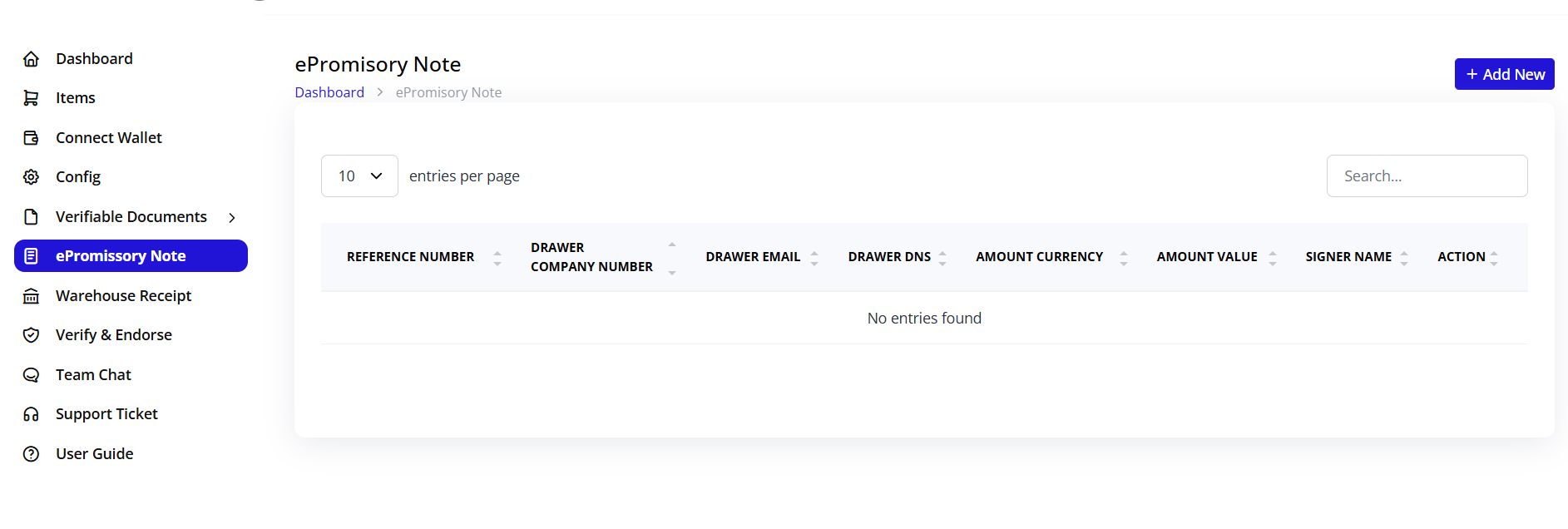
- Click ePromissory Note in sidebar
- ePromissory Note module opens
- List of existing notes displayed (if any)
Creating ePromissory Note
Step 1: Initiate Creation
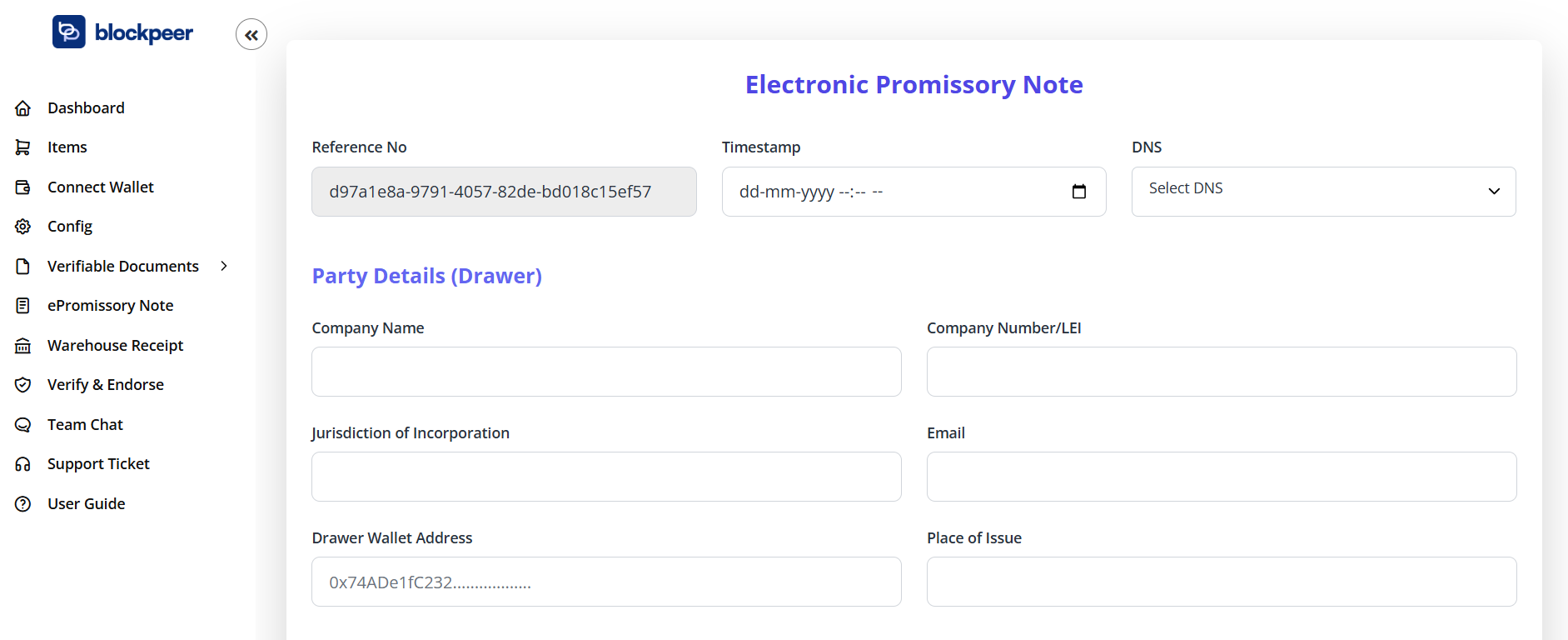
- Click + Create New or Create ePromissory Note button
- Create form opens
- Breadcrumb: Dashboard > ePromissory Note > Create
Step 2: Network and Wallet
Top-Right Controls:
Select Network:
- Dropdown showing current network
- Must match token registry network
- Cannot change after issuance
Connect Wallet:
- Blue button
- Ensure wallet connected
- Required for blockchain transaction
Step 3: Reference Number and Timestamp
Reference No: 68996744-93b7-4596-8d60-3bdf3a387296
- Auto-generated unique reference
- UUID format
- Identifies this specific note
- Used for tracking
- Cannot be changed
- Blockchain reference
Timestamp:
- Date and time picker
- Format: dd-mm-yyyy --:-- --
- When note was created
- Can set to current or specific time
- Important for legal validity
- Calendar picker available
DNS:
- Dropdown: "Select DNS"
- Choose your verified domain
- Required for TradeTrust verification
- Must be configured domain
- Links note to your identity
Step 4: Party Details (Drawer)
The Drawer is the party creating and signing the promissory note (typically the buyer/debtor).
Company Name:
- Text input field
- Legal name of drawer company
- Your company or customer company
- Full legal entity name
- As per registration documents
Company Number/LEI:
- Company registration number
- Or Legal Entity Identifier (LEI)
- Unique company identifier
- Tax ID or business number
- Required for verification
Jurisdiction of Incorporation:
- Text input field
- Where company is registered
- Country or state
- Legal jurisdiction
- Example: "Delaware, USA" or "England and Wales"
Email:
- Company email address
- Contact for drawer
- Official company email
- Used for notifications
Drawer Wallet Address:
- Blockchain wallet address
- Where drawer will sign
- 0x... format
- Must be valid address
- Drawer's identity on blockchain
Place of Issue:
- Text input field
- Where note is issued
- City and country
- Legal jurisdiction
- Example: "New York, USA"
Step 5: Drawee Details (Optional)
What is Drawee?
The drawee is the party responsible for payment.
Amount Details:**
Principal Amount:
- Numeric input
- Amount to be paid
- In specified currency
- Main obligation amount
- Example: 50,000
Currency:
- Dropdown selection
- USD, EUR, GBP, JPY, etc.
- Or cryptocurrency (USDT, USDC)
- Fiat or digital currency
- Payment denomination
Amount in Words:
- Auto-populated or manual entry
- Spelled out amount
- Legal requirement
- Example: "Fifty Thousand US Dollars"
- Prevents alteration
Step 8: Payment Terms
Issue Date:
- Date picker
- When note is created
- Starting date for terms
- Format: dd-mm-yyyy
Maturity Date:
- Date picker
- When payment is due
- Final payment date
- Must be after issue date
- Calculates tenor
Tenor/Term:
- Days between issue and maturity
- Auto-calculated
- Example: 90 days, 180 days
- Payment period
- Can be: "At sight", "30 days after sight", "On demand"
Interest Rate (Optional):
- Percentage field
- Annual interest rate
- If interest-bearing note
- Example: 5% per annum
- Leave blank if no interest
Interest Calculation Method:
- Simple interest
- Compound interest
- Daily, monthly calculation
- Specified in note terms
Step 9: Payment Details
Payment Instructions:
Payment Method:
- Bank transfer
- Cryptocurrency transfer
- Check
- Other specified method
Payment Address/Account:
- Bank account details
- Crypto wallet address
- Where to send payment
- Include all necessary details
Bank Details (if applicable):
- Bank name
- Account number
- SWIFT/BIC code
- Routing number
- Account holder name
Crypto Details (if applicable):
- Wallet address
- Network/chain
- Token type
- Payment instructions
Step 10: Terms and Conditions
Standard Clauses:
Payment Terms:
- When payment is due
- Grace period if any
- Late payment penalties
- Default interest rate
Place of Payment:
- City and country
- Legal jurisdiction
- Where payment should be made
Governing Law:
- Which jurisdiction's law applies
- Legal framework
- Dispute resolution location
- Example: "Laws of New York State"
Additional Terms:
- Special conditions
- Warranties
- Representations
- Other agreements
Notes Section:
- Free text area
- Additional information
- Special instructions
- References to contracts
Step 11: Supporting Documents
Attachments (Optional):
Upload supporting documents:
- Purchase order
- Sales contract
- Invoice
- Delivery documents
- Previous correspondence
File Upload:
- Click to browse
- Drag and drop
- Multiple files supported
- PDF, images, documents
Step 12: Review Before Issuance
Pre-Issuance Checklist:
- ✓ All party details complete and accurate
- ✓ Amounts correct (numbers and words match)
- ✓ Dates are logical (maturity after issue)
- ✓ Payment terms clearly specified
- ✓ Payment instructions complete
- ✓ DNS domain selected
- ✓ Reference number generated
- ✓ Terms and conditions included
- ✓ Supporting documents attached
- ✓ Reviewed for errors
Common Errors to Avoid:
- Mismatched amounts (numbers vs words)
- Incorrect party information
- Invalid dates
- Missing payment details
- Wrong jurisdiction
- Typos in company names
Step 13: Save or Issue
Action Buttons:
Save as Draft:
- Gray/white button
- Saves without issuing to blockchain
- Can edit later
- Not legally binding yet
- Status: Draft
Issue ePromissory Note:
- Blue button
- Publishes to blockchain
- Legally binding
- Cannot edit after
- Requires gas fee
Cancel:
- Discards changes
- Returns to list
- No data saved
Issuing ePromissory Note
Blockchain Transaction
When you click "Issue":
-
Wallet Popup Appears
- Shows transaction details
- Gas fee estimate
- Network confirmation
- Review all details
-
Transaction Details Show:
- To: Token registry address
- Data: Note details hash
- Gas Fee: Transaction cost
- Network: Selected blockchain
-
Approve in Wallet
- Click "Confirm"
- Transaction submitted
- Hash generated
- Pending confirmation
-
Wait for Confirmation
- Typically 15-60 seconds
- Progress indicator shows
- Don't close browser
- Multiple confirmations needed
-
Issuance Complete
- Success message appears
- Note status: Issued
- Blockchain transaction hash provided
- Token ID generated
- Note is now live
What Gets Recorded on Blockchain
On-Chain Data:
- Unique token ID
- Reference number
- Issue date and maturity date
- Principal amount
- Parties' wallet addresses
- Hash of document content
- Token registry link
- Timestamp
Off-Chain Data (Linked):
- Full party details
- Complete terms and conditions
- Supporting documents
- Additional notes
- Accessible via document hash
Legal Effect of Issuance
Once issued:
- Legally Binding: Enforceable promise to pay
- Immutable: Cannot be altered
- Verifiable: Anyone can verify authenticity
- Transferable: Can be endorsed and transferred
- Negotiable: Can be traded or factored
- Court Admissible: Blockchain proof accepted
Managing ePromissory Notes
ePromissory Note List
Table Columns:
REFERENCE NUMBER:
- Unique identifier
- UUID format
- Clickable to view details
DRAWER COMPANY NUMBER:
- Drawer's company ID
- Legal entity identifier
DRAWER EMAIL:
- Contact email
- Drawer's email address
DRAWER DNS:
- Linked domain
- Your verified DNS
AMOUNT CURRENCY:
- Currency code
- USD, EUR, crypto, etc.
AMOUNT VALUE:
- Principal amount
- Numeric value
- In specified currency
SIGNER NAME:
- Who signed the note
- Wallet address or name
ACTION:
- Quick action buttons
- View, download, verify
ePromissory Note Status
Status Flow:
Draft
  ↓
Issued
  ↓
Endorsed (if transferred)
  ↓
Matured (on maturity date)
  ↓
Paid
Or:
Draft
  ↓
Issued
  ↓
Dishonored (if not paid at maturity)
Status Definitions:
Draft:
- Being prepared
- Not on blockchain
- Can edit
- No legal effect
Issued:
- Published to blockchain
- Legally binding
- Ownership established
- Awaiting maturity
Endorsed:
- Transferred to another party
- New owner recorded
- Blockchain transfer complete
- Original issuer still liable
Matured:
- Past maturity date
- Payment now due
- Can demand payment
- Interest may apply
Paid:
- Payment received
- Obligation fulfilled
- Note discharged
- Recorded on blockchain
Dishonored:
- Payment not received at maturity
- Default situation
- Legal action possible
- Recorded on blockchain
Viewing ePromissory Note Details
Opening Note:
- Click reference number or View button
- Full note details display
- All information visible
Detail Sections:
Header:
- Electronic Promissory Note title
- Reference number
- Status badge
- Timestamp
- DNS domain
Party Details:
- Drawer information
- Drawee information (if applicable)
- Beneficiary information
- All contact details
Financial Terms:
- Principal amount
- Currency
- Interest rate (if any)
- Total amount due
Date Information:
- Issue date
- Maturity date
- Tenor/term
- Current status
Payment Instructions:
- Payment method
- Bank/crypto details
- Where to pay
- How to pay
Terms and Conditions:
- Full legal terms
- Governing law
- Additional clauses
- Special conditions
Blockchain Information:
- Transaction hash
- Block number
- Token ID
- Verification link
- Smart contract address
Attachments:
- Supporting documents
- Download links
- Document previews
Action Buttons on Note
Download:
- Download as PDF
- TradeTrust format (.tt file)
- Print-ready version
- Includes QR code for verification
Verify:
- Quick verify button
- Check TradeTrust status
- Verify on blockchain
- Generate verification report
Endorse/Transfer:
- Transfer ownership
- Digital endorsement
- To another party
- Blockchain transaction required
Record Payment:
- Mark as paid
- Enter payment details
- Payment date
- Transaction reference
Print:
- Print physical copy
- For records
- Legal backup
- Traditional archive
Endorsement and Transfer
What is Endorsement?
In Traditional Promissory Notes:
- Signature on back of note
- Transfers ownership
- New holder can claim payment
- Chain of endorsements
In ePromissory Notes:
- Digital signature
- Blockchain transfer
- New wallet owner recorded
- Transparent ownership chain
Why Transfer/Endorse?
Invoice Factoring:
- Sell note to factor
- Receive immediate payment
- At a discount
- Factor collects at maturity
Trade Finance:
- Banks purchase notes
- Provide working capital
- Supplier gets early payment
- Bank profits from discount
Investment:
- Sell to investors
- Yield-bearing instrument
- Secondary market
- Liquidity option
Transfer Process
Step 1: Initiate Transfer
- Open issued note
- Click Endorse or Transfer button
- Transfer form appears
Step 2: Enter Transfer Details
Recipient Information:
- Recipient name
- Wallet address (0x...)
- Email notification (optional)
- Transfer reason
Transfer Type:
- Full transfer: All rights transferred
- Partial: Split ownership (if supported)
- With recourse: You remain liable
- Without recourse: No liability
Transfer Terms:
- Transfer date
- Consideration amount (if selling)
- Conditions
- Special terms
Step 3: Approve Blockchain Transaction
- Review transfer details
- Wallet popup appears
- Approve transaction
- Pay gas fee
- Wait for confirmation
Step 4: Transfer Complete
- Ownership transferred on blockchain
- Recipient becomes new holder
- You receive confirmation
- Transfer recorded in history
- Recipient can now claim payment
Transfer History
Tracking Transfers:
Each note maintains complete history:
- Original issuer
- All subsequent owners
- Transfer dates
- Blockchain transaction hashes
- Current owner
Transparency:
- Anyone can view transfer chain
- Verifiable ownership
- No disputes
- Clear audit trail
Payment and Settlement
Recording Payment
When Payment is Received:
-
Open the note
-
Click Record Payment
-
Enter payment information:
- Payment date
- Amount received
- Payment method
- Reference/transaction ID
- Payer details
-
Upload proof (optional):
- Bank statement
- Transaction screenshot
- Payment confirmation
- Receipt
-
Submit payment record
-
Note status updates to "Paid"
Partial Payments
If Accepting Partial Payments:
- Record each payment separately
- Running balance maintained
- Shows amount remaining
- Multiple payment records
- Final payment completes note
Payment Verification
On Blockchain:
For crypto payments:
- Payment transaction on blockchain
- Verifiable by anyone
- Immutable proof
- Automatic detection possible
Traditional Payments:
For bank transfers:
- Manual recording
- Upload bank confirmation
- Reference numbers
- Audit trail maintained
Dishonored Notes
If Payment Not Received:
At Maturity:
- Note automatically marked "Matured"
- Grace period (if specified)
- If still unpaid, mark "Dishonored"
Recording Dishonor:
- Click Record Dishonor
- Enter dishonor details:
- Reason for non-payment
- Attempts to collect
- Communication history
- Blockchain transaction
- Status: Dishonored
Legal Recourse:
- Blockchain proof of obligation
- Dishonor recorded
- Legal action possible
- Court-admissible evidence
TradeTrust Verification
Verifying ePromissory Notes
Why Verify:
- Prove authenticity
- Check for tampering
- Verify issuer
- Legal validation
- Due diligence
Verification Process:
-
Download Note
- Click Download button
- Save .tt or .json file
-
Go to TradeTrust.io
- Visit https://tradetrust.io
- Click "Verify Documents"
-
Upload Note File
- Drag and drop file
- Or browse to select
- Upload to verifier
-
View Verification Results
Verification Checks:
✅ Document Integrity
- Has document been tampered with?
- Hash matches blockchain
- Content unchanged
✅ Issuer Identity
- DNS verification
- Domain matches token registry
- Legitimate issuer
✅ Document Status
- Currently valid?
- Not revoked
- Ownership confirmed
Verification for Third Parties
Banks and Financiers:
- Must verify before purchasing
- Confirms authenticity
- Risk assessment
- Compliance requirement
Verification Information Shown:
- Issuer name and domain
- Issue date
- Amount and currency
- Current owner
- Transfer history
- Blockchain details
Building Trust:
- Independent verification
- No need to trust issuer
- Blockchain proof
- Globally recognized
Interest-Bearing Notes
Adding Interest
When Creating Note:
- Specify interest rate
- Choose calculation method:
- Simple interest
- Compound interest
- Daily accrual
- Monthly accrual
Interest Calculation:
Simple Interest:
Interest = Principal × Rate × Time
Example:
- Principal: $50,000
- Rate: 5% per annum
- Term: 90 days
Interest = $50,000 × 0.05 × (90/365) = $616.44
Total Due = $50,000 + $616.44 = $50,616.44
Compound Interest:
Total = Principal × (1 + Rate/n)^(n×Time)
Interest = Total - Principal
Interest Terms
Specify in Note:
- Interest rate percentage
- Calculation method
- Compounding frequency
- Day count convention (30/360, actual/365)
- Interest payment schedule
Late Payment Interest:
- Default interest rate
- Penalty rate
- When it applies
- How calculated
Legal Considerations
Legal Validity
Electronic Promissory Notes:
- Legally equivalent to paper notes
- Recognized under:
- UNCITRAL MLETR (Model Law on Electronic Transferable Records)
- Uniform Commercial Code (USA)
- Bills of Exchange Act (UK and Commonwealth)
- National electronic transaction laws
Requirements for Validity:
- In Writing: Electronic form acceptable
- Signed: Digital signature valid
- Unconditional Promise: To pay
- Fixed Amount: Specific sum
- Payable to Order or Bearer: Negotiable
- Payable on Demand or at Definite Time: Clear terms
Jurisdiction Considerations
Governing Law:
- Specify in note
- Which country's law applies
- Important for enforcement
- Dispute resolution
Cross-Border Notes:
- International law applies
- Convention on International Bills
- Hague Securities Convention
- Local law compliance
Dispute Resolution
In Case of Dispute:
Blockchain Evidence:
- Immutable proof
- Timestamped records
- Clear ownership
- Transfer history
Arbitration Clause:
- Consider including
- Faster resolution
- Lower cost
- Enforceable internationally
Court Proceedings:
- Blockchain evidence admissible
- TradeTrust verification
- Clear documentation
- Strong legal position
Advanced Features
Conditional Notes
Conditional Payment:
Some notes may include:
- Payment upon delivery
- Upon inspection approval
- Subject to contract completion
- Other conditions precedent
Smart Contract Integration:
- Automatic payment release
- When conditions met
- Blockchain verification
- Reduces disputes
Multi-Party Notes
Multiple Beneficiaries:
- Split payment
- Multiple payees
- Proportional distribution
- Complex arrangements
Co-Makers/Guarantors:
- Joint liability
- Multiple drawers
- Guarantee structure
- Enhanced security
Note Chains
Linked Notes:
- Series of notes
- Installment payments
- Structured finance
- Complex transactions
Parent-Child Notes:
- Master note
- Sub-notes
- Hierarchical structure
- Consolidated tracking
Integration with Other Modules
E-Invoice Connection
Invoice-Backed Notes:
- Create note from invoice
- Link to specific invoice
- Payment against invoice
- Integrated workflow
Process:
- Create eInvoice
- Buyer creates ePromissory Note
- Note references invoice
- At maturity, invoice marked paid
Trade Finance Integration
With Banks:
- Submit note for financing
- Bank verification via TradeTrust
- Approval process
- Fund disbursement
Factoring Companies:
- Upload note for factoring
- Instant verification
- Quick approval
- Early payment received
Reporting and Analytics
ePromissory Note Reports
Portfolio View:
- All outstanding notes
- Total value
- Maturity schedule
- Risk assessment
Aging Report:
- Notes by maturity date
- Overdue notes
- Payment collection priority
- Cash flow forecasting
Transfer Report:
- All endorsements
- Current holders
- Transfer history
- Factoring analysis
Financial Analysis
Cash Flow Projection:
- Expected receipts
- By maturity date
- Scenario analysis
- Planning tool
Discount Analysis:
- If selling notes
- Calculate discount rate
- Compare offers
- Optimize timing
Best Practices
Creating Notes
Clear Terms:
- Unambiguous language
- Specific amounts and dates
- Clear payment instructions
- Complete party details
Proper Documentation:
- Attach supporting documents
- Reference underlying transaction
- Include all agreements
- Complete audit trail
Accurate Information:
- Verify all party details
- Double-check amounts
- Confirm dates
- Review before issuing
Managing Notes
Track Maturity:
- Calendar reminders
- Follow up before maturity
- Prepare for collection
- Prompt payment requests
Maintain Records:
- Download copies
- Backup blockchain hashes
- Keep correspondence
- Document everything
Professional Communication:
- Clear payment reminders
- Professional tone
- Document all interactions
- Escalate appropriately
Security
Wallet Security:
- Secure private keys
- Use hardware wallet for high values
- Multi-signature for large notes
- Regular security audits
Due Diligence:
- Verify counterparties
- Check creditworthiness
- Assess payment risk
- Document assessment
Troubleshooting
Q: Transaction failed when issuing note A: Check wallet has sufficient gas tokens. Increase gas limit. Verify network connection. Try again with higher gas price.
Q: Cannot transfer note A: Ensure note is in "Issued" status. Verify recipient wallet address. Check you are current owner. Ensure sufficient gas fee.
Q: Note not verifying on TradeTrust A: Confirm DNS is properly configured. Re-download the .tt file. Try verifying again. Check file format is correct.
Q: Want to modify issued note A: Cannot modify issued notes (blockchain immutable). Must cancel and reissue. Or create amended note referencing original.
Q: Drawer disputes note A: Blockchain provides proof of creation. Transaction hash is evidence. Legal action may be needed. Consult legal counsel.
Q: Payment made but note still shows unpaid A: Manually record payment. Provide payment proof. Update status. Blockchain transactions may be pending.
Q: Lost access to note A: Notes are on blockchain permanently. Recover wallet to regain access. Use blockchain explorer to view. Contact support for help.
Frequently Asked Questions
Q: Is ePromissory Note legally binding? A: Yes, in jurisdictions recognizing electronic negotiable instruments. Same legal effect as paper promissory notes.
Q: Can I enforce payment legally? A: Yes. ePromissory Note is evidence of debt. Blockchain proof is admissible in court. Legal enforcement same as paper.
Q: How much does it cost? A: Only blockchain gas fees. Typically $0.10-$2 per note. No monthly fees or subscription costs.
Q: Can I sell/transfer the note? A: Yes! That's the key feature. Transfer via blockchain. New owner can claim payment at maturity.
Q: What if drawer doesn't pay? A: Record dishonor on blockchain. Take legal action if needed. Blockchain proof supports your case.
Q: Do I need the other party's permission to issue? A: Drawer (payer) creates the note. Beneficiary (payee) receives it. Both parties should agree to terms beforehand.
Q: Can I create note in any currency? A: Yes. Fiat currencies (USD, EUR, etc.) or cryptocurrencies. Specify in note. Payment in agreed currency.
Q: How long are notes stored? A: Forever on blockchain. Permanently accessible. Cannot be deleted. Always verifiable.
Q: What if I made a mistake? A: If draft, edit and correct. If issued, cannot change. Create new note or amendment. Blockchain records are permanent.
Q: Can banks accept ePromissory Notes? A: Yes. Many banks accept TradeTrust-verified notes. Check with your bank. Increasingly common for trade finance.
Summary
ePromissory Note brings negotiable instruments to the blockchain:
- ✅ Legally Binding: Same status as paper notes
- ✅ Transferable: Digital endorsement and transfer
- ✅ Verifiable: TradeTrust global verification
- ✅ Secure: Blockchain immutability
- ✅ Efficient: Instant transfers, no physical handling
- ✅ Cost-Effective: Minimal transaction fees
- ✅ Trade Finance Ready: Factoring and discounting enabled
Transform Trade Credit:
- Create ePromissory Note
- Issue to blockchain
- Transfer for financing
- Verify on TradeTrust
- Receive payment at maturity
- Digital trade future
Next: Learn about Warehouse Receipt for commodity financing