Information Request
Overview
The Information Request module facilitates communication between companies and interested investors. When an investor wants to learn more about a pre-approval request, they submit an information request, and companies share additional documentation and details through this module.
Understanding Information Requests
What is an Information Request?
An information request occurs when:
- An investor reviews your pre-approval request
- They express interest and need more details
- A formal information request is created
- You're notified to provide additional documentation
Information Request Status
- Pending Response: Waiting for you to provide information
- Under Review: Investor is reviewing your submitted information
- Approved: Investor is ready to proceed to financing stage
- Declined: Investor has decided not to proceed
- Expired: Response deadline has passed
Responding to Information Requests
Step 1: View Information Requests
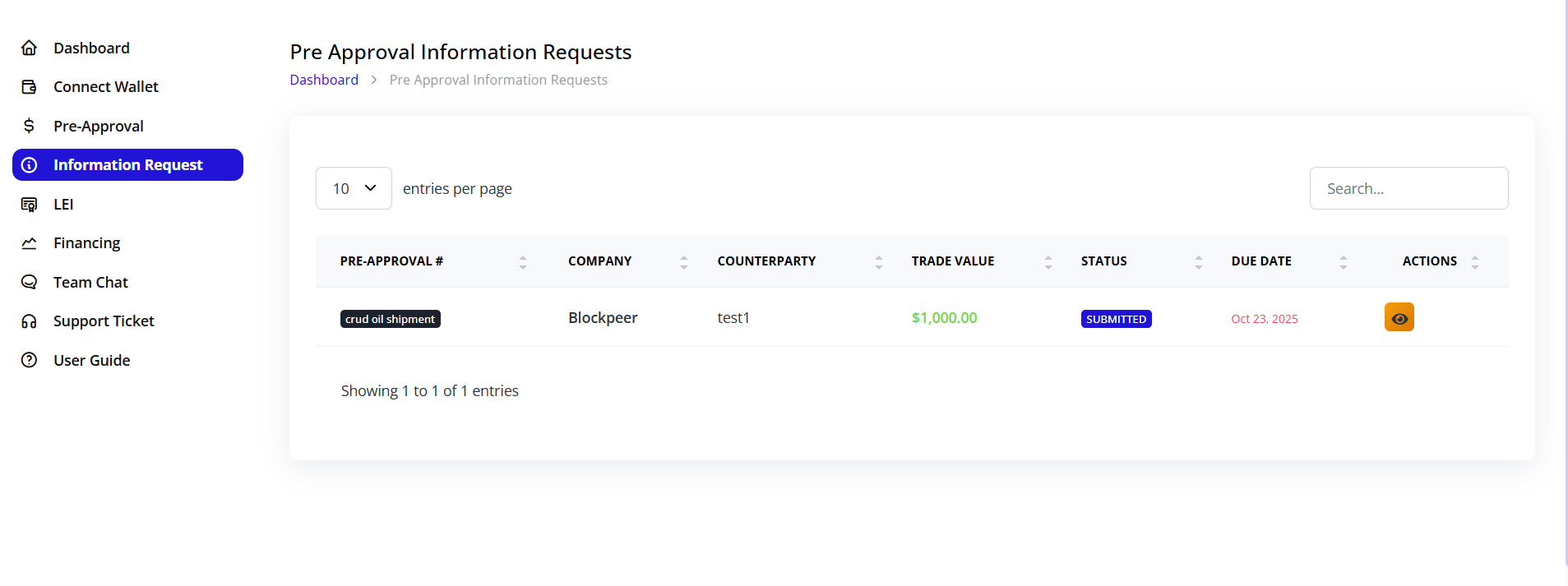
- Navigate to Information Requests from the dashboard
- You'll see all active requests with:
- Investor name (may be anonymous initially)
- Request date
- Deadline for response
- Status
Step 2: Review Investor Questions
- Click on an information request to open it
- Review the specific information requested:
- Financial statements
- Additional trade documentation
- Company credentials
- Specific questions about the trade
- References or past trade history
Step 3: Prepare and Upload Documents
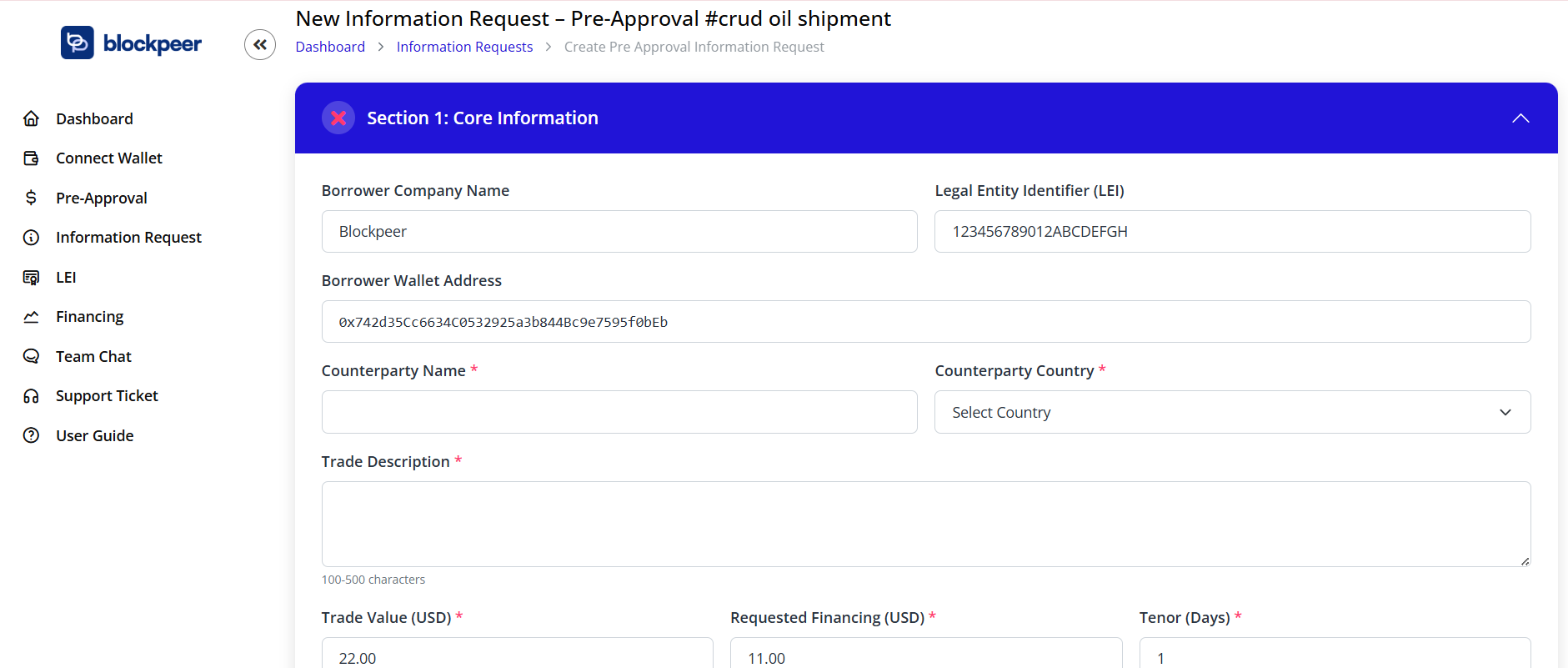
Upload the requested information:
Financial Documents
- Audited financial statements (last 2-3 years)
- Bank statements (last 6 months)
- Tax returns
- Credit reports
Trade Documents
- Detailed purchase orders
- Sales contracts with full terms
- Shipping documents (if applicable)
- Insurance certificates
- Quality certificates
Company Documents
- Business registration and licenses
- Company profile and structure
- Management team credentials
- References from previous trades
Additional Information
- Written responses to specific questions
- Excel sheets with trade calculations
- Market analysis or reports
- Any other supporting documentation
Step 4: Add Comments and Submit
- Add a cover message explaining the documents
- Highlight key information investors should review
- Provide additional context if needed
- Click Submit Response
Managing Information Sharing
Document Security
- All documents are encrypted during transmission
- Only the requesting investor can access your information
- You can set expiration dates for sensitive documents
- Track who has viewed your documents
Communication Features
Internal Notes
- Add private notes visible only to your team
- Track decisions and discussions
Messages to Investor
- Send messages directly to the requesting investor
- Clarify questions before submitting formal responses
- Negotiate terms informally
Tracking and Follow-up
- Monitor response status in real-time
- Receive notifications when:
- Investor reviews your information
- Additional clarification is needed
- Investor makes a decision
- Set reminders for pending requests
Multiple Investor Requests
Handling Multiple Interests
When multiple investors request information:
- Each request is tracked separately
- You can share different information levels based on investor
- Prioritize based on:
- Investor credibility
- Proposed terms
- Response deadline
- Accept the best offer and notify others
Batch Responses
For common information requests:
- Create a document package
- Upload once
- Share with multiple investors
- Customize specific answers as needed
Best Practices
- Respond Promptly: Quick responses show professionalism and maintain investor interest
- Be Thorough: Provide complete information to avoid back-and-forth delays
- Organize Documents: Use clear file names and organize by category
- Maintain Confidentiality: Only share what's necessary; protect sensitive information
- Professional Communication: Keep all messages clear and business-like
- Follow Up: Check status regularly and follow up on pending reviews
Information Request Checklist
Before submitting your response:
- ✓ All requested documents are uploaded
- ✓ Documents are current and relevant
- ✓ File names are clear and professional
- ✓ Questions are answered completely
- ✓ Cover message provides context
- ✓ Contact information is included
- ✓ All uploads are readable and complete
Privacy and Security
What Investors Can See
- Only information you explicitly share
- Your company name and basic profile
- Pre-approval request details
- Documents you upload in response
What Investors Cannot See
- Your responses to other investors
- Information from other trade requests
- Your internal notes
- Dashboard activity
Troubleshooting
Q: I missed the response deadline. What should I do? A: Contact the investor directly through the messaging feature to request an extension. Some investors may still consider late responses.
Q: Can I withdraw information after submitting? A: Once submitted, information cannot be withdrawn. However, you can add clarifications or updates.
Q: The investor is asking for sensitive financial information. Should I share it? A: Share only what you're comfortable with. You can provide summary information or request a non-disclosure agreement first.
Q: How do I know if my information is sufficient? A: Investors will either approve, request more information, or decline. You'll receive clear notification of their decision.
Q: Can I update information after submission? A: Yes, click Add Update on the information request to provide additional documents or clarifications.