Exchange Import
Import transaction data from cryptocurrency exchanges for comprehensive reporting.
Transaction Import List
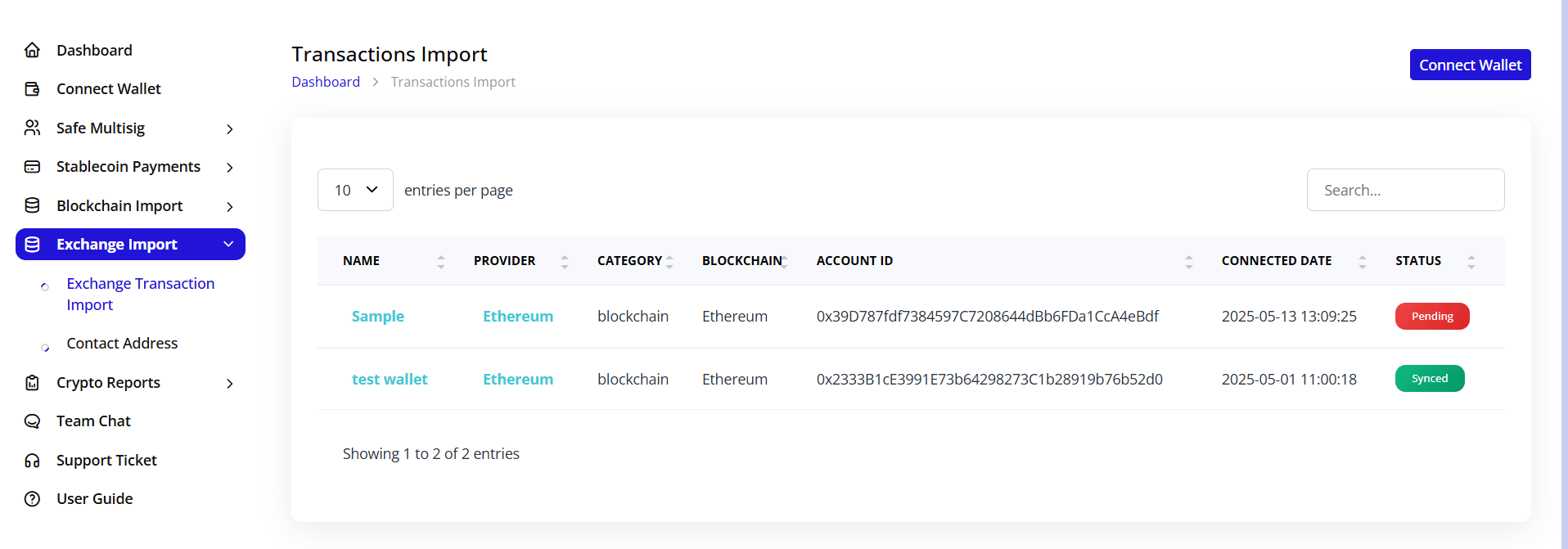
Overview
View all imported exchange accounts:
- Name: Exchange account identifier
- Provider: Exchange platform (Ethereum, Binance, etc.)
- Category: Account type (blockchain, exchange)
- Blockchain: Network type (Ethereum)
- Account ID: Exchange wallet address
- Connected Date: Import timestamp
- Status: Sync status (Pending/Synced)
Managing Imports
Access options through the Connect Wallet button:
- View existing imports
- Add new exchange connections
- Check sync status
Exchange Transaction Details
Viewing Balances
Click on any exchange import to view:
-
Account Information:
- Connection date
- Account address
- Blockchain network
- Sync status
-
Balances Tab:
- Ticker: Token symbol
- Imported Amount: Initial balance
- Fiat Ticker: Currency (USD)
- Fiat Value: USD value
- Calculated Balance: Current holdings
- Token Ledger: View detailed ledger
- Actions: View token details (eye icon)
Features
- Real-time balance updates
- Historical balance tracking
- Multi-token support
- Fiat value conversion
- Detailed transaction ledgers