FIATA Format eBL
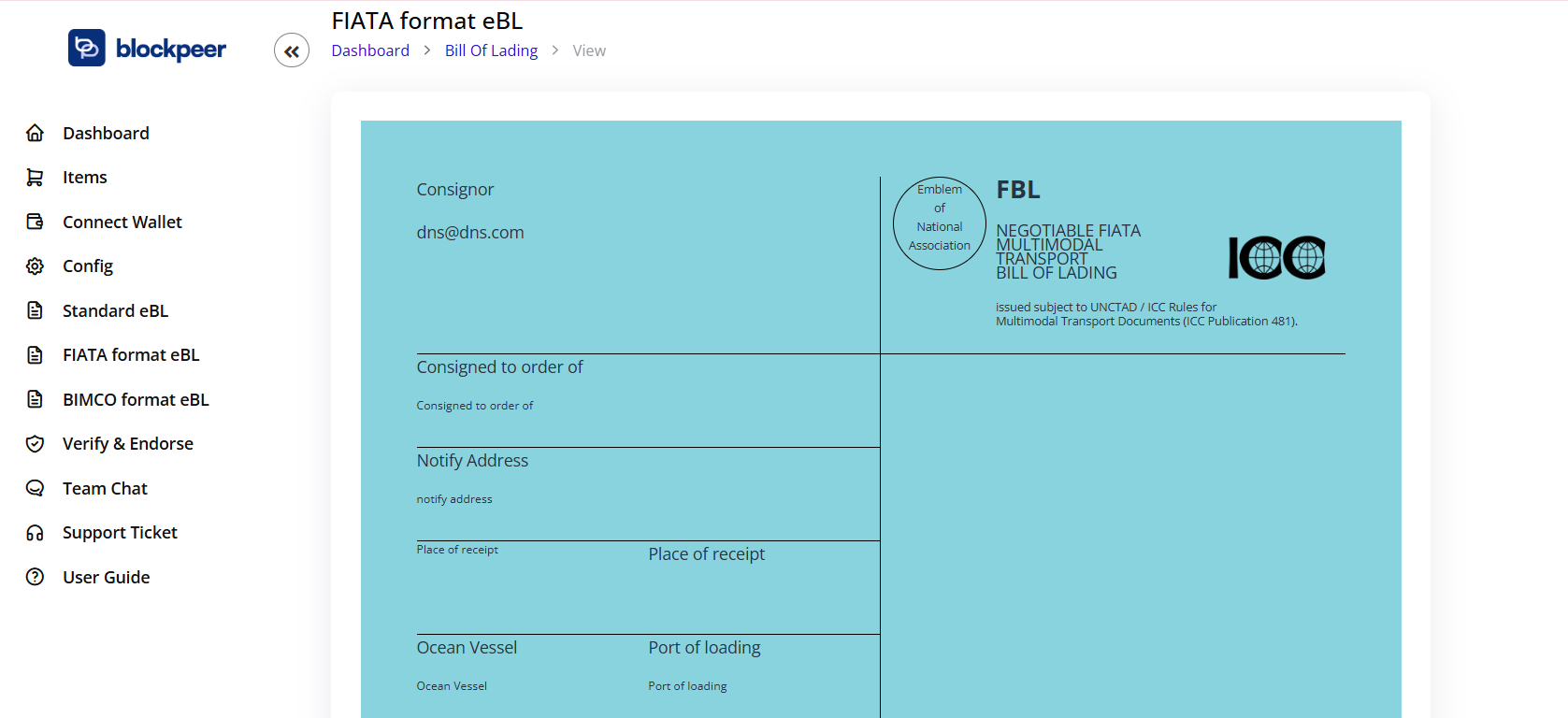
The FIATA (International Federation of Freight Forwarders Associations) format eBL is designed specifically for multimodal transport operations managed by freight forwarders.
1. Overview
The FIATA eBL format includes:
- Consignor and consignee information
- Notify address details
- Port of loading, discharge, and delivery information
- Ocean vessel details
- Detailed goods description with marks, numbers, and measurements
- Freight amount and payment terms
- Cargo insurance details
- Declarations and signatures
2. View FIATA eBLs
Access FIATA eBL List
- Click on FIATA format eBL from the left sidebar
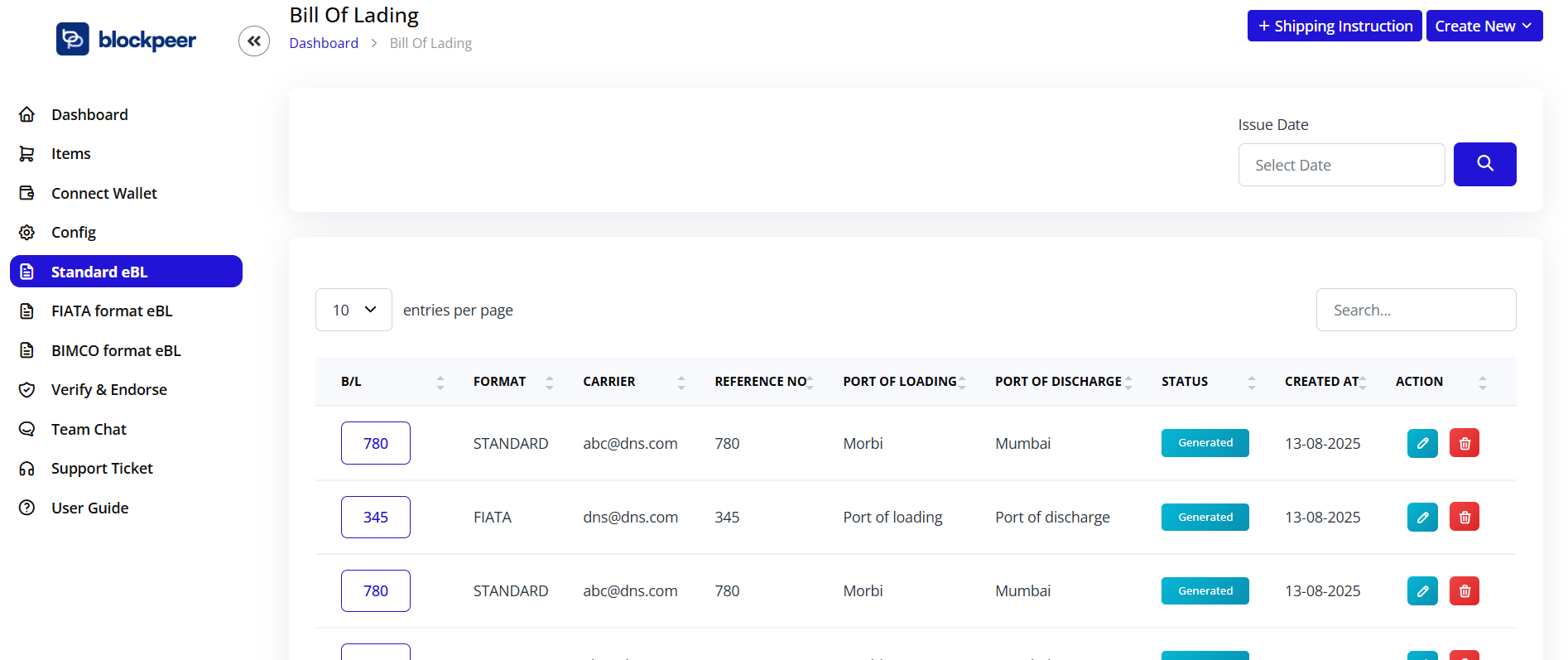
- You'll see a list of all your FIATA format eBLs
List View Information
The list displays:
- B/L: Bill of Lading reference number
- FORMAT: FIATA
- CARRIER: Carrier email address
- REFERENCE NO: Reference number
- PORT OF LOADING: Origin port
- PORT OF DISCHARGE: Destination port
- STATUS: Document status
- CREATED AT: Date of creation
- ACTION: Edit and delete buttons
3. Create FIATA eBL
Step 1: Access Creation Form
- Click on FIATA format eBL from the sidebar
- Click the + Create New button
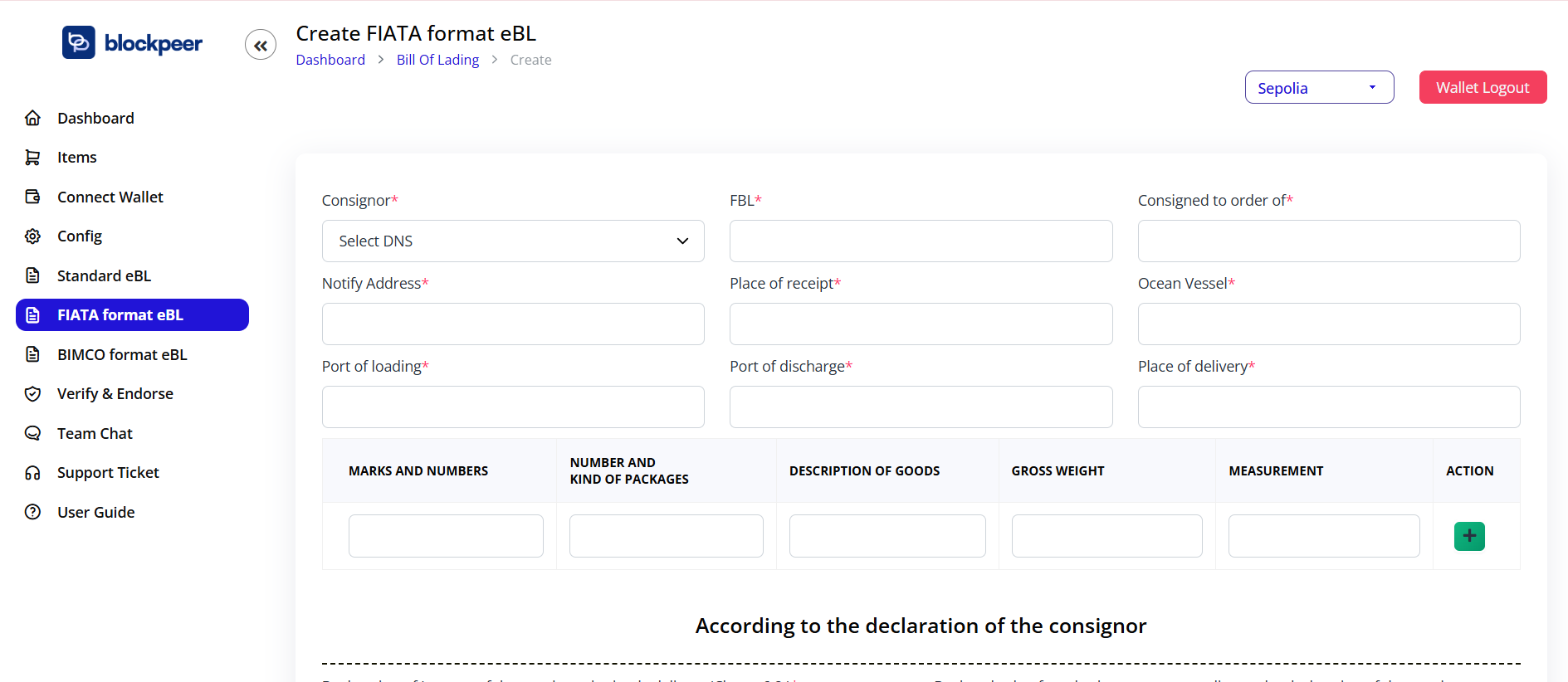
- You'll be taken to the "Create FIATA format eBL" form
Step 2: Consignor Information
Consignor
- Select DNS from dropdown
- This is the freight forwarder or shipper
Step 3: FBL (FIATA Bill of Lading) Number
FBL
- Enter your FIATA Bill of Lading number
- Must be unique
Step 4: Consigned to Order Of
Consigned to order of
- Enter the party to whom goods are consigned
- Can be "to order" or specific party name
Step 5: Location Information
Notify Address
- Enter the address of party to be notified
Place of receipt
- Enter the place where goods are received by the forwarder
Ocean Vessel
- Enter the vessel name for ocean transport leg
Step 6: Port Information
Port of loading
- Enter the port where goods are loaded onto vessel
Port of discharge
- Enter the port where goods are discharged from vessel
Place of delivery
- Enter the final delivery location
Step 7: Goods Description
Add detailed cargo information in the table format:
- MARKS AND NUMBERS: Container numbers, marks, and identifying information
- NUMBER AND KIND OF PACKAGES: Quantity and type of packages
- DESCRIPTION OF GOODS: Detailed description of the cargo
- GROSS WEIGHT: Total weight in kg or tons
- MEASUREMENT: Volume in cubic meters
- ACTION: Click + to add more rows
Step 8: Declaration According to Consignor
This section contains the consignor's declaration clauses:
Declaration of Interest
"Declaration of interest of the consignor in timely delivery (Clause 6.2.)"
- Enter the declared value for ad valorem rate if applicable
Clauses 7 and 8
"Declared value for ad valorem rate according to the declaration of the consignor (Clauses 7 and 8)."
- Specify any declared values
Step 9: Freight Information
Freight amount
- Enter the total freight charges
Freight payable at
- Enter the location where freight is payable
Step 10: Additional Information
Number of Original FBL's
- Enter the number of original FIATA Bills issued
For delivery of goods please apply to
- Enter the party responsible for delivery
Step 11: Place and Date of Issue
Place and date of issue
- Select the place and date where FBL is issued
- Use the date picker for date selection
Step 12: Cargo Insurance
Cargo Insurance through the undersigned
Choose one option:
- ☐ The undersigned: Insurance arranged by the forwarder
- ☐ Covered according to attached Policy: Insurance policy attached
Step 13: Signature
Signed for the Carrier carrier
- Click Sign here button
- Sign using your connected wallet
- Digital signature will be cryptographically recorded
Step 14: Company Stamp (Optional)
- Upload your company logo or stamp
- Accepted formats: JPG, PNG, GIF
- Appears on the generated FIATA eBL
Step 15: Preview and Generate
- Click Preview toggle to review the document (optional)
- Review all information
- Click Generate eBill Of Lading button
- Confirm the blockchain transaction in your wallet
- Wait for confirmation
- Your FIATA eBL is created and blockchain-verified
4. Edit FIATA eBL
Modify an Existing FIATA eBL
- From the FIATA eBL list, click the Edit button
- Update the required fields
- Click Update button
- Confirm the transaction
- A new version is recorded on blockchain
5. Delete FIATA eBL
Remove a FIATA eBL
- Click the Delete button (trash icon)
- Confirm deletion
- The eBL will be removed from your active list
⚠️ Note: The blockchain record remains for audit trail purposes.
6. FIATA eBL Features
Key Advantages
- Multimodal Transport: Designed for door-to-door shipments
- Freight Forwarder Friendly: Tailored for FIATA members
- International Recognition: Accepted globally by FIATA network
- Blockchain Verified: Immutable and tamper-proof
- TradeTrust Compatible: Interoperable with global trade platforms
When to Use FIATA eBL
Use FIATA format when:
- You are a freight forwarder
- Shipment involves multimodal transport
- You need FIATA FBL compliance
- Door-to-door delivery is involved
- Multiple carriers are used in the journey
✅ Next: Learn how to create BIMCO format eBL or explore Verify & Endorse features.